
You finish a video call, reach for your coffee and notice that turning your head feels stiff. By mid-afternoon, your shoulders have crept towards your ears, your eyes are fixed on a laptop below eye level, and the ache at the base of your neck is harder to ignore. You haven't lifted anything heavy, yet desk work has left you feeling as though your upper body has been holding a load all day.
Neck pain from sitting at a desk often develops through a combination of prolonged stillness, workstation strain and muscular fatigue. Improving posture can help, but posture correction alone isn't always enough. The more useful question is how often you change position, how your workstation supports you, and whether your routine gives your neck regular opportunities to move.
Table of Contents
- Understanding the Hidden Toll of Desk Work
- Optimising Your Workspace for Neck Health
- Simple Stretches to Release Neck Tension
- Building a Sustainable Movement Routine
- When to Seek Professional Osteopathic Care
Understanding the Hidden Toll of Desk Work
A typical workday can look harmless in small pieces. You answer emails, review a spreadsheet, join a meeting and concentrate on a document. The problem appears when those tasks keep you in almost the same position for long stretches, with your head angled towards a screen and your shoulders braced.
At first, the symptoms may be easy to dismiss. You might notice tightness when reversing the car, a dull ache after closing your laptop or a headache that seems to arrive with deadlines. Many people keep working until the discomfort becomes persistent, then try to correct their posture by pulling their shoulders back and holding themselves rigidly upright. That often creates a different form of strain.

Why desk workers deserve practical advice
The Australian evidence is enough to validate what many office and remote workers experience. A one-year longitudinal study of Australian office workers recorded a 49% incidence of neck pain, with a 95% confidence interval of 36% to 62%, meaning nearly one in two participants developed neck pain during the study period (Australian office worker study). This is not just a matter of someone having a “bad” posture. Sustained sitting, computer use and limited movement can combine to load the neck repeatedly across the day.
The wider population burden is also substantial. A regional analysis placed Australasia at the lowest age-standardised point prevalence among global regions, but still recorded 1,360 cases per 100,000 people, an estimated 494,000 prevalent cases and 48,800 years lived with disability (regional neck pain burden analysis). The same analysis reported 135.0 age-standardised years lived with disability per 100,000 people in Australasia. Even where the regional rate is comparatively lower, neck pain still affects daily function at a meaningful scale.
Clinical perspective: A sore neck after desk work is common, but common doesn't mean you have to accept it as the price of employment.
The aim isn't to hold a perfect position for eight hours. Human bodies are designed to move between positions. A well-adjusted desk can reduce unnecessary strain, but regular movement is what prevents one tolerable position from becoming an exhausting one.
Optimising Your Workspace for Neck Health
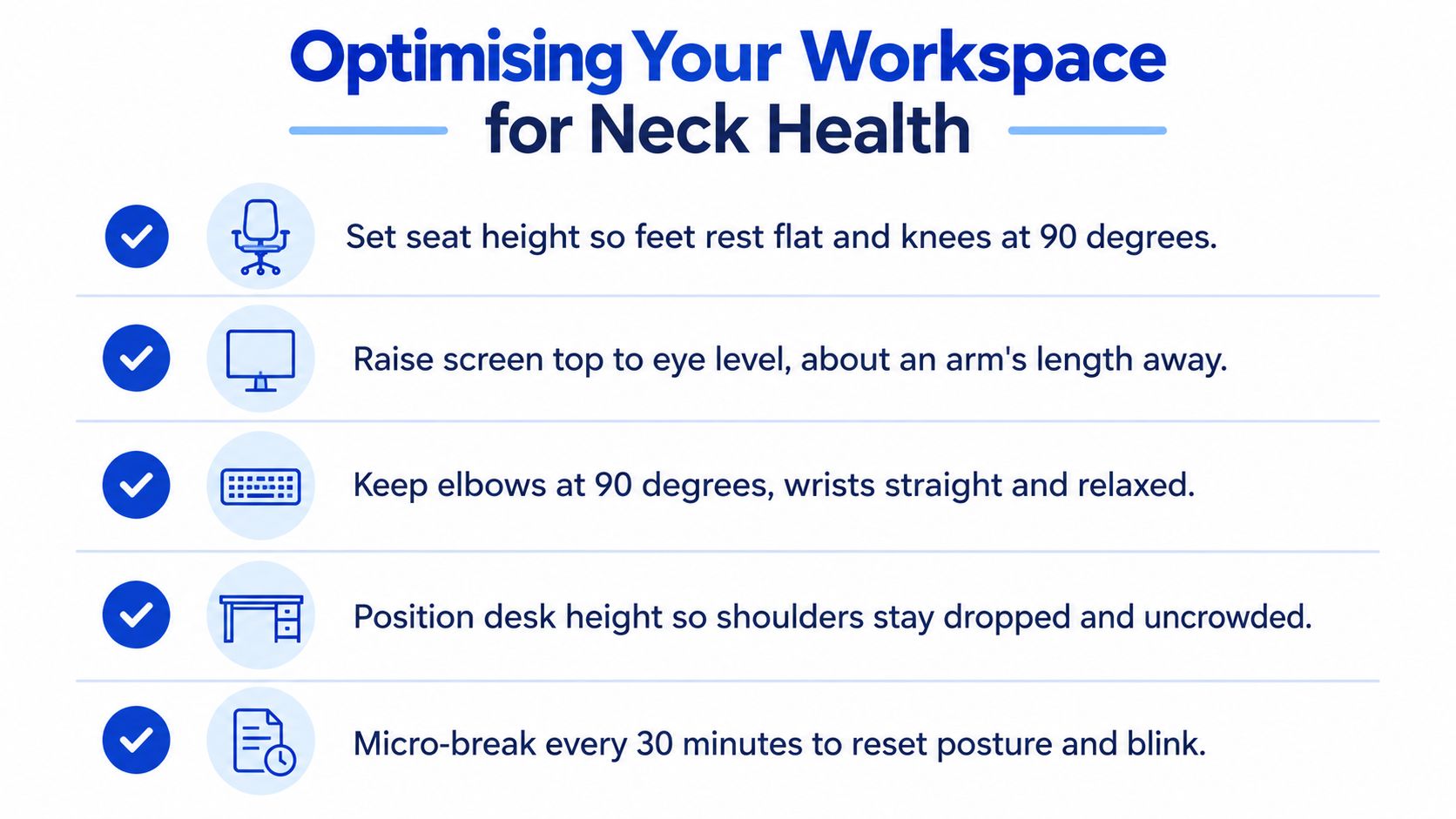
Start with the screen, because your eyes strongly influence where your head goes. Place the top of the monitor at, or close to, eye level so you can look ahead without repeatedly dropping your chin. Keep the screen far enough away that you can read comfortably without leaning towards it, and increase text size rather than moving your face closer.
Australian desk-worker guidance recommends keeping the screen at eye level, avoiding one sitting position for too long, and taking regular stretch-and-move breaks (Healthdirect neck pain guidance). These adjustments work together. Raising a monitor won't help much if your keyboard forces you to reach forwards, and a supportive chair won't compensate for a laptop that remains low on the desk all day.
Make the main adjustments first
Set your chair so your feet rest securely on the floor and your hips feel supported. Your knees should be comfortably bent, rather than dangling or pushed high towards your chest. Sit back into the chair instead of perching at the front, but don't treat the backrest as a reason to stay frozen.
Next, bring the keyboard and mouse close enough that your elbows can remain near your sides. Your forearms should reach the desk without your shoulders lifting or rounding forwards. If the desk is too high, lowering the chair may leave your feet unsupported, so use a footrest or adjust the work surface where possible.
Keep frequently used items within easy reach. Repeatedly stretching across the desk for a notebook, phone or second monitor encourages your trunk and neck to rotate or lean. If you use a laptop for extended work, a separate keyboard and mouse allow you to raise the laptop screen without sacrificing arm position.
Use this setup checklist
| Component | Ideal position | Common mistake |
|---|---|---|
| Chair | Feet supported, pelvis stable and back comfortably supported | Sitting on the edge and leaning towards the screen |
| Monitor | Screen centred in front of you, with the top near eye level | Looking down at a laptop for the whole workday |
| Keyboard and mouse | Close to the body, with relaxed shoulders and neutral wrists | Reaching forwards with raised shoulders |
| Desk | High enough for comfortable arm position without shrugging | Compensating for an unsuitable height by hunching |
| Phone and documents | Positioned so you can view them without sustained neck rotation | Cradling the phone between the ear and shoulder |
A posture and corporate ergonomics visual can help you review these relationships at a glance. You can also use this workstation posture reference when checking your desk at home or in the office.

Avoid forcing your shoulders down or squeezing your shoulder blades together. A neutral position should feel supported and relatively easy, not like an exercise you must hold with constant effort.
Simple Stretches to Release Neck Tension
Movement should feel gentle, controlled and useful, not like a test of flexibility. If a stretch produces sharp pain, dizziness, new tingling or symptoms that travel into the arm, stop and seek individual advice rather than pushing through it.
Begin with a simple neck rotation. Sit tall enough to breathe comfortably, let your shoulders soften and turn your head slowly towards one side. Stop before the movement becomes painful, return to centre and repeat on the other side. The goal is to remind the neck that it can move, not to force it to reach a particular range.
A short desk sequence
Try these movements during a natural pause in your work:
- Chin glide: Keep your gaze level and gently draw your chin backwards, as though making a small double chin. Hold briefly, relax completely and repeat with minimal effort. Don't tip your head down.
- Side-neck lengthening: Let one ear move towards the same-side shoulder while keeping the opposite shoulder relaxed. You should feel a mild lengthening along the side of the neck, not a strong pull.
- Shoulder circles: Roll both shoulders up, back and down, then reverse the direction. Make the circles smooth and let your breathing remain easy.
- Upper-back opening: Place your hands loosely behind your head or across your chest. Let your upper back extend over the chair back while keeping the movement small and comfortable.
- Levator stretch: Turn your head slightly towards one armpit and allow your gaze to angle down. Use no force. This can reach the area that often feels tight between the side of the neck and the top of the shoulder.
You don't need special equipment or a large space. A few calm repetitions can be enough to interrupt the sensation of being locked into the screen. If you prefer visual guidance, follow the movement demonstration below, but keep the range comfortable rather than copying it rigidly.
Stretching can reduce the feeling of tension, but it doesn't remove the reason that tension keeps returning. If the monitor remains low or you sit through long uninterrupted tasks, the same symptoms may reappear. Use the desk-based rehabilitation movement visual as a reminder that comfortable movement should be part of the workday, not reserved only for formal exercise.

Never bounce into a stretch or hold your breath. Gentle movement is usually more useful than an aggressive stretch performed occasionally.
Building a Sustainable Movement Routine
The most effective routine is one you can repeat while answering emails, attending meetings and meeting deadlines. Waiting until the end of the day to perform a long stretch session leaves your neck exposed to the same uninterrupted load for hours. A better approach is to distribute small movement opportunities through the day.
Safe Work Australia reports that 81% of Australian workers have some occupational sitting exposure, half sit at work often or all the time, and uninterrupted sitting bouts longer than 20 to 30 minutes are likely to be detrimental (Safe Work Australia review of sedentary work). The practical message isn't that every seated task is harmful. It's that long, unbroken bouts deserve attention.
Build movement into existing tasks
Use transitions you already have instead of relying on motivation. Stand while listening to a call when the meeting doesn't require video. Walk to speak with a colleague rather than sending a message when that suits the workplace. Place your printer, water bottle or rubbish bin far enough away that you occasionally leave the chair without turning the task into a disruption.
For computer-heavy work, set a recurring reminder or use a calendar prompt to change position. When it appears, don't aim for a complicated exercise session. Stand, look away from the screen, move your shoulders and walk a short distance before returning to work.
Match the break to the task
A brief reset during focused typing may involve opening the chest, rotating the neck comfortably and lowering the shoulders. After a long meeting, walking and changing the position of the whole body may be more useful than another seated stretch. During a phone call, alternate between sitting and standing rather than holding one posture from beginning to end.
Practical rule: Change position before discomfort becomes the signal that you need to move.
A standing desk can make variation easier, but it isn't a cure by itself. Standing rigidly in one position can replace one static exposure with another. Keep the monitor and keyboard adjusted for the standing height, shift your weight naturally and return to sitting when your body asks for it.
Posture correction also needs moderation. A relaxed, varied posture is more realistic than maintaining a highly braced “ideal” position. If a movement reminder becomes another source of stress, make it smaller and attach it to a reliable cue, such as finishing a meeting or sending a report.
When to Seek Professional Osteopathic Care
Mild stiffness that settles with movement and improves as you adjust your work habits can often be managed conservatively. You can review the screen height, vary your position, try gentle mobility and observe whether the pattern changes. That approach is different from ignoring symptoms that continue to escalate.
Professional assessment becomes more appropriate when pain keeps returning despite sensible changes, restricts ordinary neck movement or interferes with sleep, work or daily activities. Seek prompt medical attention for concerning symptoms such as new weakness, significant numbness or tingling, pain that travels into the arm, severe unremitting pain, or symptoms following a substantial injury. Sudden or unusual symptoms should be assessed by a qualified health professional rather than attributed to desk posture.
Self-care and hands-on care serve different purposes
Self-care helps you alter the daily inputs that may be aggravating your neck. It can improve how you work, but it can't identify every contributor to persistent pain. An osteopathic consultation can consider your symptoms, movement patterns, work habits and the relationship between your neck, upper back and shoulders before suggesting an individual plan.
Hands-on care may include soft-tissue techniques, joint articulation and gentle mobilisation, combined with movement advice and practical self-management. The appropriate approach depends on the person in front of the practitioner, not just on the fact that they work at a desk.
Bayside Osteopathic Health provides gentle, hands-on osteopathic care designed to ease pain, improve mobility and support natural healing for people across the Bayside community. Its practitioners assess how the body moves as a whole and can combine treatment suited to each person with movement guidance for persistent neck or postural discomfort.
An assessment is particularly useful when you aren't sure whether your chair, screen, workload or movement pattern is driving the symptoms. Bring details about when the pain appears, what makes it better or worse, whether it spreads beyond the neck and how your workday is organised. A clear history helps the practitioner distinguish a manageable desk-related pattern from symptoms that need referral or further medical investigation.
You can also review this neck and shoulder movement resource alongside your workstation changes. The aim isn't to chase perfect posture. It's to restore comfortable movement, reduce avoidable aggravation and give you a practical plan that fits the way you work.

If neck pain keeps returning during computer work, Bayside Osteopathic Health can assess your movement, workstation-related strain and day-to-day habits, then provide gentle hands-on care with practical self-management advice. Visit Bayside Osteopathic Health to learn more and arrange an appointment in the Bayside community.