
By late afternoon, it often starts the same way. Your wrist feels tight when you reach for the mouse. Then typing feels heavier than it should. Maybe there's a dull ache along the thumb side of the wrist, maybe a burning feeling into the forearm, or maybe your hand just feels clumsy and tired.
That kind of wrist pain from typing is common, but it shouldn't be brushed off as “just part of desk work”. In practice, the people who recover best usually do three things early: they calm the irritation down, they change the habits that keep reloading it, and they look beyond the wrist itself when symptoms won't settle.
Table of Contents
- Understanding Why Your Wrists Hurt From Typing
- Quick Relief Strategies You Can Use Today
- Building Your Ergonomic Workstation
- Essential Stretches and Strengthening Exercises
- Smart Typing Habits to Protect Your Wrists
- When to See an Osteopath for Wrist Pain
Understanding Why Your Wrists Hurt From Typing
Typing looks low effort, but the strain comes from repetition and position, not from one big load. Think of it as a thousand small cuts. One keystroke won't hurt you. Thousands done with a bent wrist, raised shoulders, tight forearms, and no real breaks can irritate tissue surprisingly quickly.
A 2024 meta-analysis on typing-related RSI and carpal tunnel found that carpal tunnel syndrome has a prevalence of 14.4%, and 69% of workers who reported a repetitive strain injury identified wrist pain as the primary symptom. That matters because it tells you two things. First, wrist pain from typing is not unusual. Second, it's common enough that early action is worth taking seriously.
What typing is really doing to the wrist
Your wrist works best in a fairly neutral position. When it sits bent back, angled sideways, or held stiff for long periods, the tendons and nerves moving through a small space at the front of the wrist have less room and more friction.
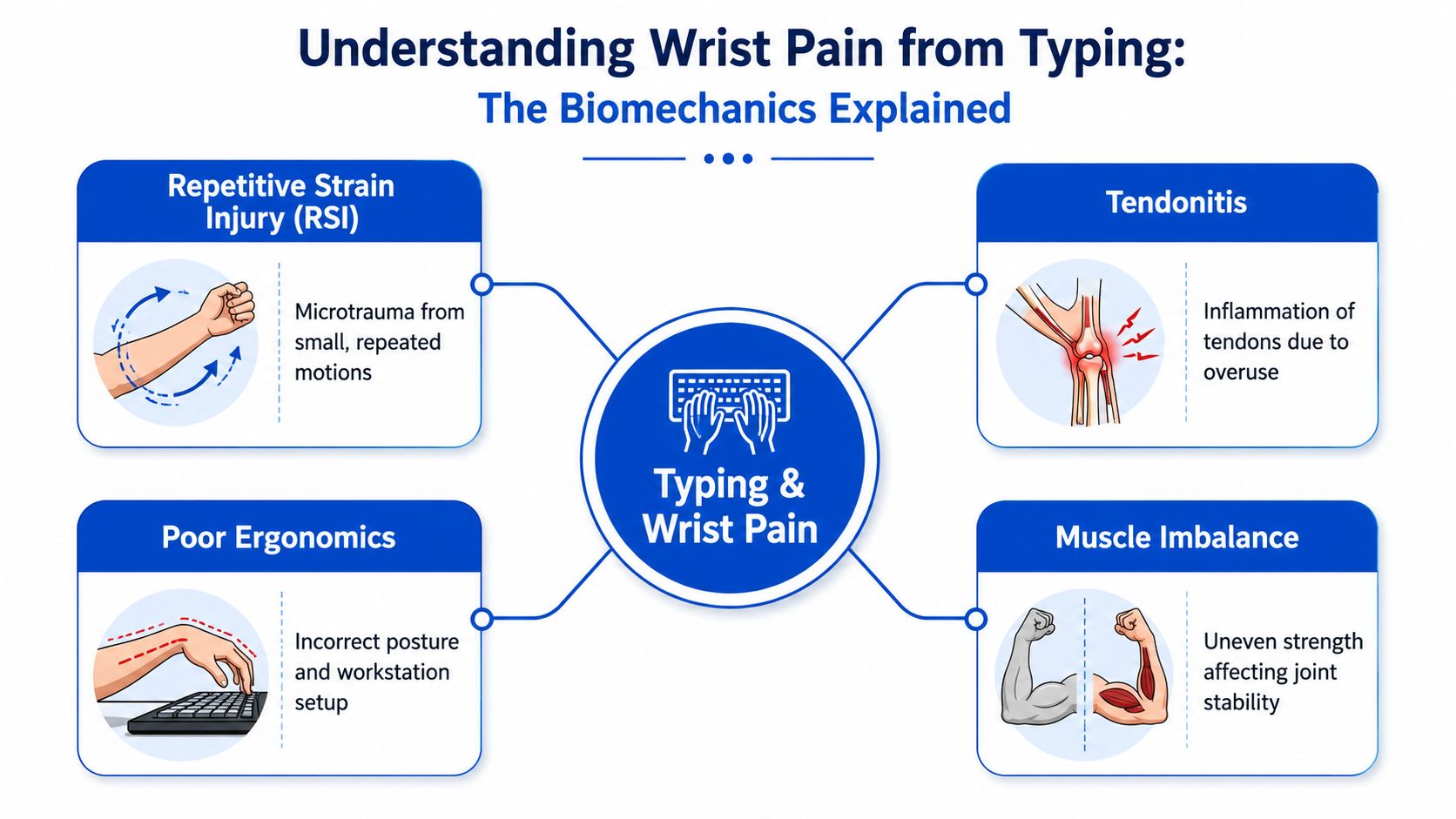
That can show up in a few different ways:
- Repetitive strain injury is the broad umbrella. It means the tissue has been overloaded by repeated small movements.
- Tendon irritation usually feels local. You might notice an ache with gripping, lifting a mug, or typing for longer stretches.
- Carpal tunnel irritation tends to involve nerve symptoms. Tingling, numbness, or a buzzing feeling into the thumb and fingers are common clues.
Practical rule: Pain from desk work is often cumulative. The body usually gives quieter warning signs first, such as stiffness, hand fatigue, or soreness that eases overnight.
The main patterns behind desk-related wrist pain
Often, the underlying issue isn't a single cause. Rather, it's a stack of smaller ones.
A flat laptop on a desk encourages wrist extension. A mouse that sits too far away makes the shoulder work harder. A monitor that's too low encourages forward-head posture. Then the neck, shoulder, forearm, and wrist all start sharing strain poorly.
That's why two people can use the same computer for the same number of hours and feel very different by the end of the day. One moves often, types lightly, and has good support through the forearms. The other braces through the shoulders, hovers the hands, and drives every key with more force than needed.
A useful question is not “Why does typing hurt?” It's “Where is the strain starting, and what keeps repeating it?”
Quick Relief Strategies You Can Use Today
When your wrist is already irritated, the first job isn't to stretch aggressively or push through a deadline. It's to reduce the load enough for the tissue to settle. That often works better than chasing relief with random gadgets.
Settle it down first
For a fresh flare-up, a simple RICE-style approach can help:
- Rest the irritated activity briefly. That doesn't mean complete immobility. It means reducing the specific tasks that provoke symptoms, especially long uninterrupted typing and mouse use.
- Ice the area if it feels hot, throbbing, or freshly aggravated. Wrap the ice pack in a cloth. Keep it short and comfortable rather than intense.
- Compression can help some people if there's mild swelling or a sense of instability. It shouldn't feel tight or cause tingling.
- Elevation is useful if the wrist feels puffy after a long day.
What usually doesn't work well is total bed rest, forceful stretching into pain, or testing the wrist every ten minutes to see if it's “better yet”. Irritated tissue likes calm, gentle movement and less provocation.
If a movement eases stiffness and leaves the wrist feeling freer afterwards, it's probably useful. If it leaves a lingering ache, back off.
Use breaks that actually interrupt the strain cycle
A national survey cited in Australian RSI guidance found that 72% of cases resolved within 4 to 6 weeks when people strictly followed a 20-2-1 rule. That means 20 minutes of typing, 2 minutes of active stretching, and 1 minute of standing movement.
That rule works because it changes the pattern before the tissue gets overloaded again. It's far more effective than waiting until your wrist is already burning.
Try this during the workday:
- After each typing block: Open and close your hands slowly. Roll the shoulders. Let the elbows straighten.
- During the 2-minute movement break: Gently move the wrists through a comfortable range. Keep it easy, not forceful.
- For the 1-minute stand: Walk to refill water, stand for a call, or step away from the desk.
A common mistake is taking “breaks” while still scrolling on the phone. That keeps the hands active and the neck flexed. It doesn't give the system much of a reset.
Small decisions matter more than heroic fixes
If your wrist is sore today, reduce what aggravates it today. Use voice dictation for a few tasks. Swap some mouse work for keyboard shortcuts. Split up long writing sessions. These aren't signs of weakness. They're load management, and that's often what gets symptoms moving in the right direction.
Building Your Ergonomic Workstation
Ergonomics gets talked about as if you need an expensive office fit-out. You usually don't. What you do need is a setup that stops your body drifting into positions it can't tolerate for long.
A key benchmark comes from a peer-reviewed study on typing and carpal tunnel pressure, which found workstation adjustments should prevent wrist extension greater than 30°. The same source notes that staying within those benchmarks correlates with a 40% reduction in recurrence of mild carpal tunnel symptoms.
The setup details that matter most
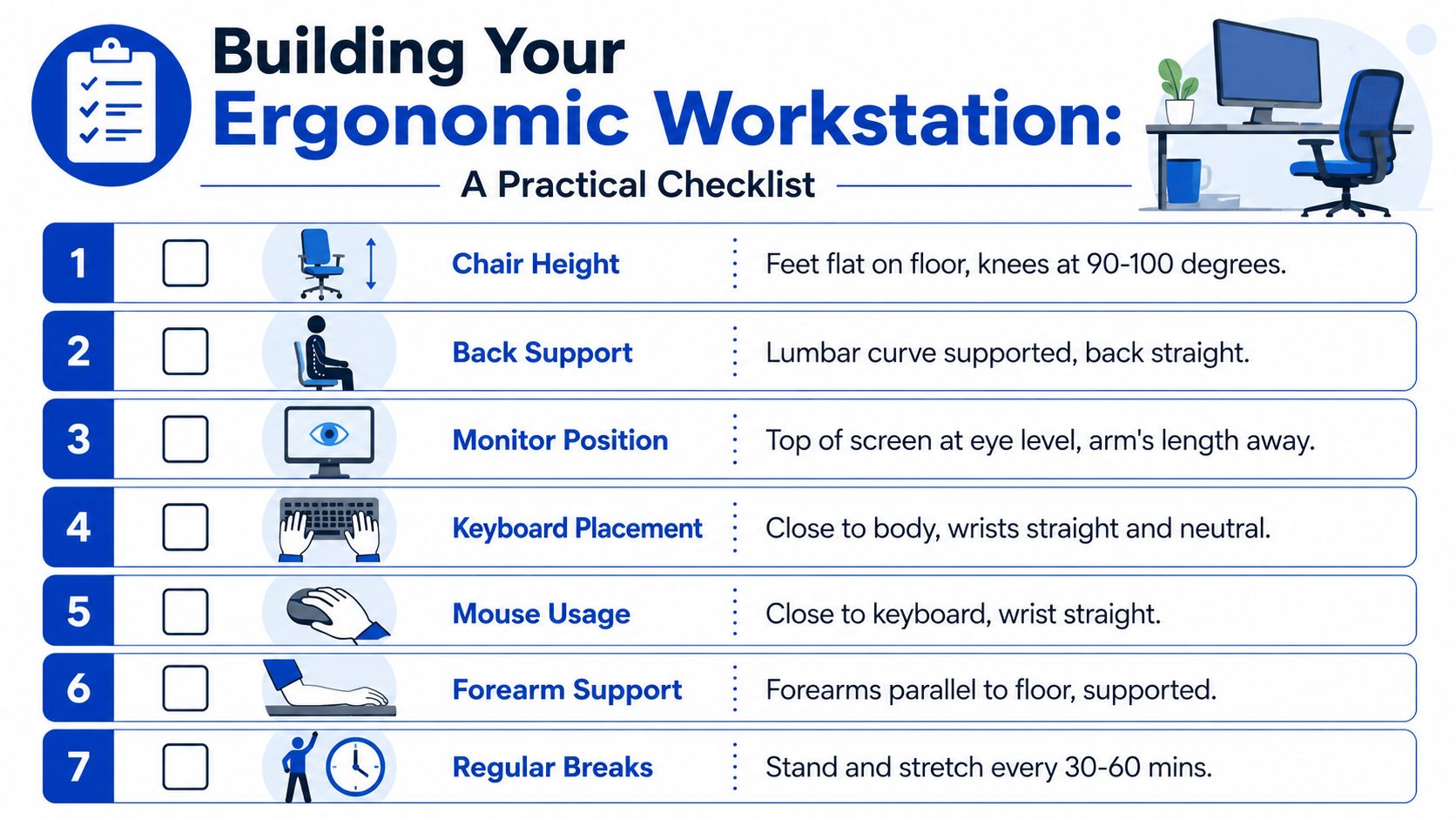
The basic checkpoint is simple. If your wrists are bent back while typing, the setup still needs work.
Use this framework:
| Area | What to aim for | What usually goes wrong |
|---|---|---|
| Chair | Elbows comfortably near a right angle, shoulders relaxed | Chair too low, shoulders hiked |
| Keyboard | Close enough that elbows stay by your sides | Reaching forward from the shoulders |
| Mouse | Next to the keyboard, not out to the side | Constant side reach and wrist angling |
| Screen | High enough to avoid dropping the head | Neck poking forward all day |
The biggest offender is the laptop on its own. It forces a compromise. If the screen is at eye level, the keyboard is too high. If the keyboard feels workable, the screen is too low. That's why an external keyboard and mouse often make such a difference.
For a visual example of the broader posture piece, this corporate ergonomics posture guide shows the kind of alignment you're trying to create through the whole upper body.

A practical desk audit
Run through this at your desk right now:
- Check your wrists first. Are they straight, or are they cocked back toward you?
- Look at your elbows. If they're reaching forward, pull the keyboard closer.
- Notice your shoulders. If they're creeping up, lower the keyboard position or raise the chair and support the feet.
- Test the mouse position. If you have to abduct the arm to reach it, move it in.
- Fix the screen cheaply. A stack of books can raise a monitor or laptop screen. You don't need perfect equipment to create better angles.
Good ergonomics shouldn't feel like “holding posture”. A useful setup supports better position without constant effort.
Essential Stretches and Strengthening Exercises
The right exercises help. The wrong ones can keep an irritated wrist annoyed for longer. The key is to stay in a gentle, pain-free range and to think of exercise as tissue preparation, not punishment.
Start with mobility before strength. A stiff, sore wrist usually doesn't want heavy loading first.
Gentle mobility first
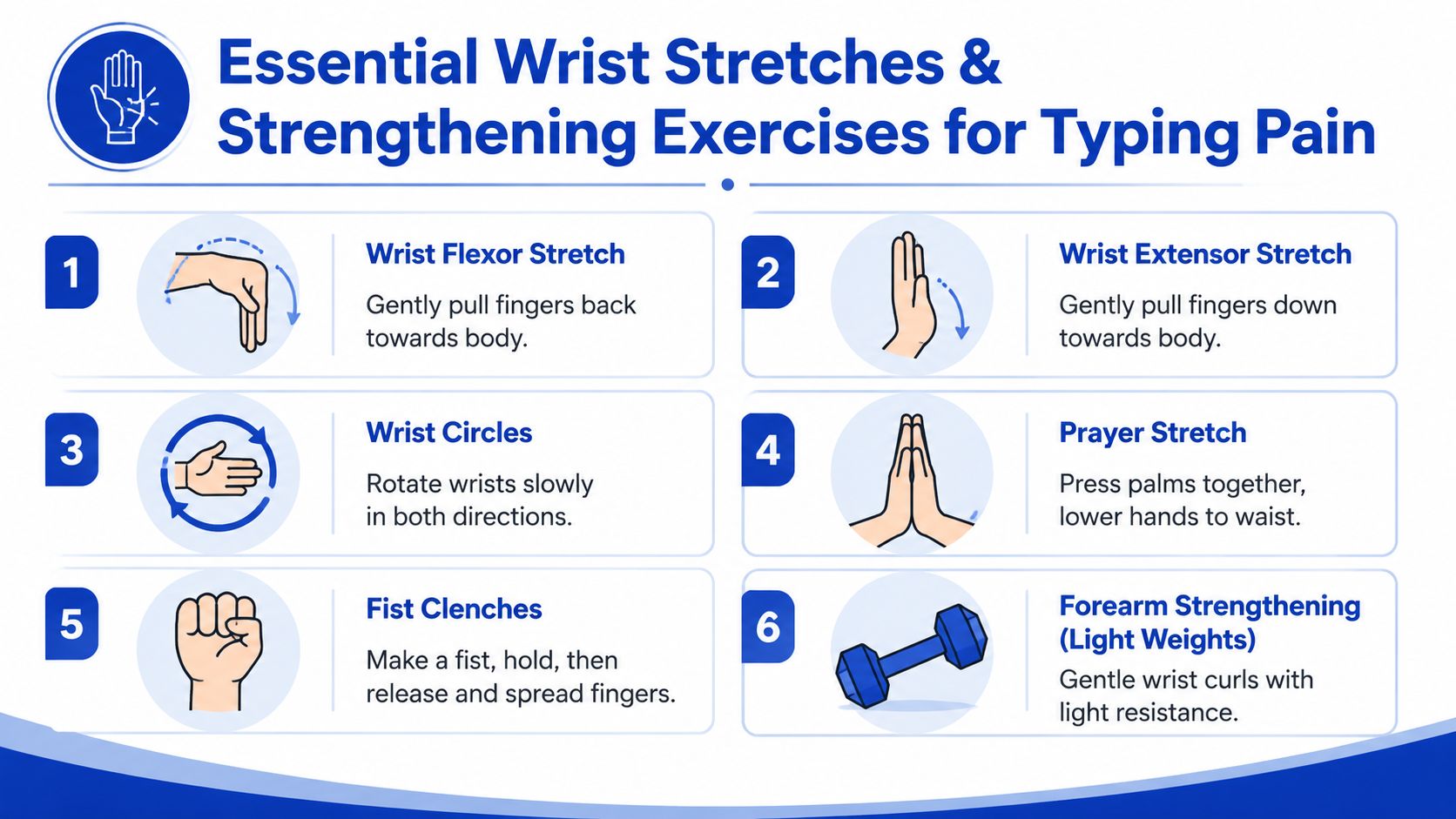
These movements are simple enough to do at your desk:
Wrist flexor stretch
Straighten one elbow with the palm facing up. Use the other hand to guide the fingers down gently until you feel a mild stretch through the forearm. Don't yank.Wrist extensor stretch
Straighten the arm with the palm facing down. Gently bend the hand so the fingers move toward the floor. You should feel a stretch along the top of the forearm.Wrist circles
Make slow, controlled circles in both directions. Keep the movement relaxed and smooth.Prayer stretch
Bring the palms together in front of the chest, then lower the hands slowly while keeping the palms touching. Stop before pain.
This rehabilitation image can help you picture the kind of calm, guided movement that usually works best in recovery from desk strain: rehabilitation exercise example.

A short visual guide can also help with form:
Then build tolerance gradually
Once the wrist is less reactive, add low-load strengthening.
Try these:
Fist clenches
Close the hand gently, hold briefly, then open the fingers wide. This helps with circulation and hand control without much joint stress.Light wrist curls
Use very light resistance. Support the forearm, move slowly, and stop well before fatigue changes your form.Controlled mouse-hand lifts
Rest the forearm on the desk, then lift and lower the hand in a small range. This builds tolerance in the forearm muscles that often tire during long computer sessions.
Strengthening should leave the area feeling worked, not stirred up. If symptoms ramp up later that day, the dose was too high.
The best routine is the one you'll repeat. Two or three minutes done consistently beats an ambitious program you abandon after three days.
Smart Typing Habits to Protect Your Wrists
A good setup won't save a poor pattern. Plenty of people sit at an ergonomic desk and still type with hard key strikes, locked shoulders, and wrists planted on the desk edge for hours.
That's why smart typing habits matter. They reduce the mechanical stress your hands absorb on every single task.
Stop typing like force is harmless
Most adults use more force than they need. You can hear it in the keyboard. Heavy typing creates unnecessary tension through the fingers and forearm, and that tension doesn't stay local. It travels up into the elbow and shoulder.
The same goes for “anchoring” the wrist. If you jam the heel of the hand into the desk or the edge of a wrist rest while moving the fingers constantly, you create pressure and friction rather than support. Wrist rests are for pauses, not for pressing into while actively typing.
A better approach is to:
- Type lightly. Let the keys do the work.
- Move from the forearm and shoulder when needed. Don't make the wrist handle every small reach.
- Keep the hands floating softly, not rigidly. Supported forearms help. A tense hover usually doesn't.
Protective habits that hold up in real workdays
The strongest prevention strategies are behavioural, not glamorous. They're also what professionals who spend all day at a screen tend to overlook.
Consider building these into your day:
- Use keyboard shortcuts more often. Less repetitive mouse travel usually means less wrist deviation.
- Batch similar tasks. Alternate between typing-heavy work, calls, reading, and standing tasks instead of doing one long uninterrupted keyboard block.
- Change position before pain makes the decision for you. Stand for a meeting. Shift to a different chair for reading. Work at a bench for a short period if available.
- Notice the neck and shoulders. If they tighten, your wrists usually follow.
This workplace injury prevention guide is a useful reminder that prevention usually comes from repeated small corrections, not one perfect fix.

A lot of people treat discomfort as a productivity problem and try to push through it. In practice, that often backfires. When the forearms tire and the shoulders brace, typing gets less efficient, not more. Smooth, lighter movement is usually the higher-performance option over a full workweek.
When to See an Osteopath for Wrist Pain
Self-care is often enough for an early flare-up. Persistent symptoms are different. If you've already improved the workstation, reduced aggravating tasks, and changed your break habits but the wrist still keeps returning to the same painful pattern, it's time to look wider.

Signs self-care isn't enough
A more complete assessment makes sense if you notice any of the following:
- Pain that keeps returning once your workload increases again
- Tingling or numbness into the hand or fingers
- Pain spreading into the forearm, elbow, shoulder, or neck
- Weak grip or clumsiness with ordinary tasks
- Night pain or morning stiffness that doesn't settle with the usual changes
These signs don't automatically mean something severe is happening, but they do suggest the problem may be more than local wrist irritation.
Why the wrist isn't always the starting point
This is the part many generic guides miss. Wrist pain from typing often looks local but behaves like a whole-chain problem.
According to AIHW musculoskeletal data from 2025, only 15% of people with persistent office-related pain find relief through self-managed ergonomics alone, and 65% of chronic typing pain patients have underlying postural compensations in the spine and neck. That lines up with what an osteopathic assessment is designed to explore.
An osteopath doesn't just ask where it hurts. They look at how the neck moves, whether the upper back is stiff, how the shoulder blade sits, how the forearm muscles are loading, and whether the wrist is compensating for restrictions elsewhere.
A wrist can be the site of pain without being the true driver of the problem.
That whole-body view matters because treatment often needs more than wrist stretches. Gentle soft-tissue work, joint articulation, and mobilisation through the neck, upper back, shoulder, elbow, and wrist can reduce the tension patterns that keep reloading the area. Just as important, you get advice specific to the actual mechanism involved, not a generic list of desk tips.
If your symptoms are new and mild, start with the practical steps above. If they keep coming back, if nerve symptoms are appearing, or if your wrist pain from typing is affecting work and sleep, getting it assessed sooner usually makes recovery simpler.
If wrist pain from typing isn't settling, Bayside Osteopathic Health offers gentle, hands-on osteopathic care focused on the whole picture, not just the sore spot. We assess how your neck, shoulders, upper back, forearms, and wrists are working together, then tailor treatment and practical self-care to help you move more comfortably and get back to work with less strain.