
You sit down feeling fine. By mid-morning, your lower back starts to nag. After lunch, you shift in your chair every few minutes, trying to find a position that feels less irritating. By the end of the day, standing up is the hardest part. That pattern is common in office workers and remote workers who spend long stretches seated, especially when the chair doesn't match the body using it.
From an osteopathic point of view, that gradual build-up matters. Pain that ramps up during sitting and eases when you get moving often points to a mechanical, ergonomic problem rather than a dramatic injury. A good chair won't fix every kind of back pain, but the right setup can change how load travels through your spine, muscles, hips, and legs. If your current setup looks anything like this corporate posture example, your chair may be working against you more than you realise.

Table of Contents
- Why an Ergonomic Chair Matters for Back Pain
- Understanding the Biomechanics of Seating and Back Pain
- Essential Chair Features to Reduce Back Pain
- How to Evaluate and Adjust Your Ergonomic Chair
- Posture and Movement Strategies While Seated
- Real Examples and Case Studies of Pain Relief
- Clinical Tips from Osteopathy and Red Flags
- Next Steps for Comfortable Sitting
Why an Ergonomic Chair Matters for Back Pain
A chair matters because sitting isn't passive. Your body is still working the whole time. If the chair doesn't support your shape, your muscles have to do extra holding, bracing, and compensating just to keep you upright.
In Australia, non-specific lower back pain linked to prolonged sitting represents the majority of back pain cases, and a well-adjusted ergonomic chair with proper lumbar support and seat depth is described as a practical and safe intervention for this population. That's why the right ergonomic chair for back pain is more than a comfort purchase. It's part of how you reduce repeated daily irritation.
Think of a typical workday. At first, you perch on the front of the seat. Later, you slump. Then you tuck one foot under, lean to one side, or sit bolt upright because “good posture” feels forced. Each of those positions changes which tissues carry the load.
Practical rule: If your pain builds gradually during sitting and settles once you stand or walk, your chair and desk setup deserve close attention before you assume something serious is wrong.
People often get confused here. They expect one feature, usually lumbar support, to solve every symptom. But different pain patterns need different chair changes. A dull lower back ache doesn't behave like sciatica, and tailbone irritation doesn't behave like upper back tension. Matching the chair to the pain mechanism is what makes the advice useful.
Understanding the Biomechanics of Seating and Back Pain
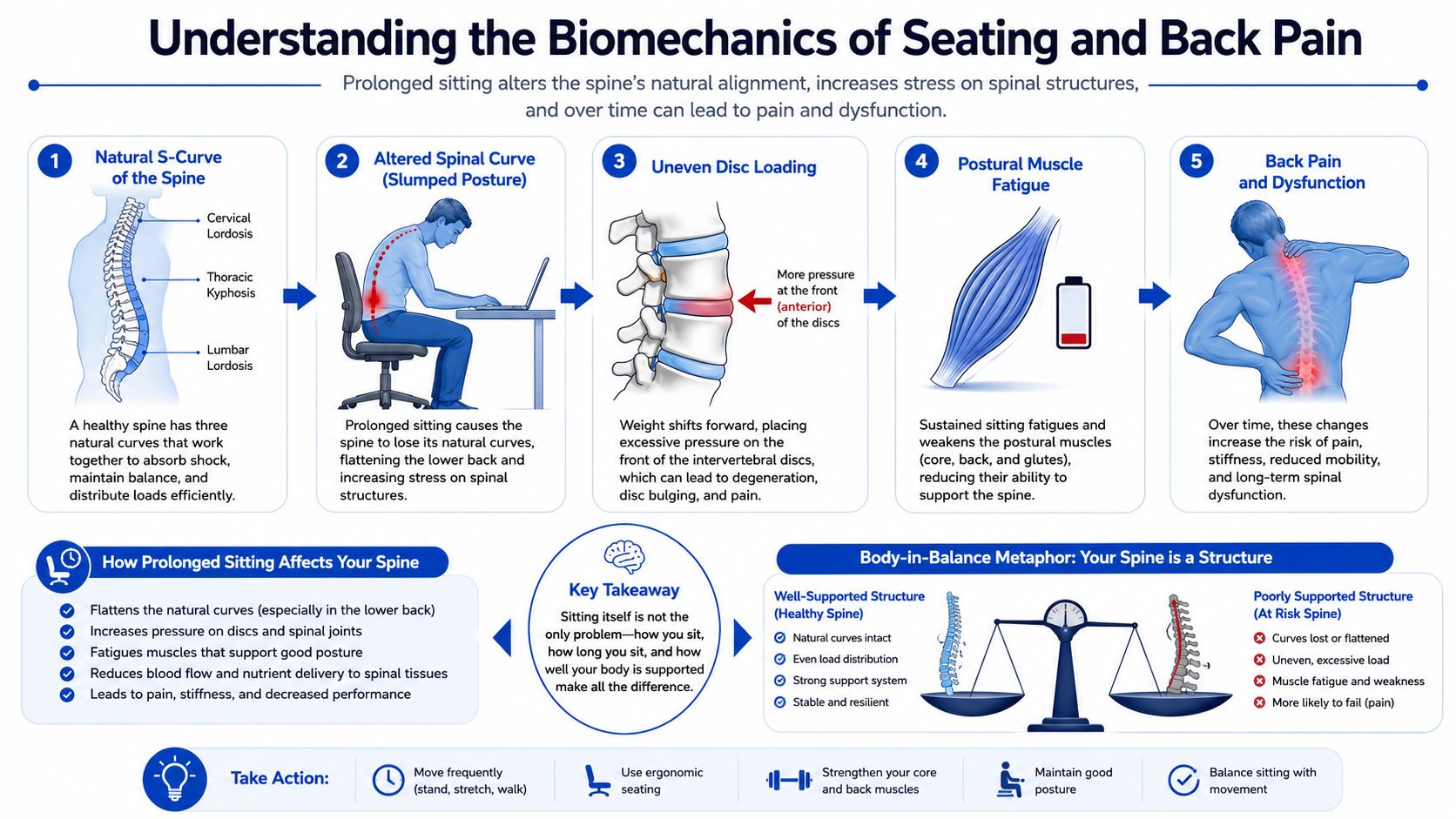
When people hear “posture”, they often think about sitting taller. However, the key issue is load. Your spine is designed with curves that help spread force. When sitting strips away those curves, nearby muscles and discs pick up the extra work.
What changes when you sit for too long
The lower back normally has a gentle inward curve called lordosis. Without support, that curve tends to flatten in sitting. Once that happens, the load doesn't disappear. It shifts.
A useful way to picture it is a tent with a slightly loosened centre pole. If the pole loses shape, the fabric and ropes have to strain harder to keep the tent standing. Your back behaves in a similar way. If the lumbar curve collapses, postural muscles tighten to compensate, discs face less even loading, and ligaments may get stressed by prolonged hanging at end range.
This is one reason an ergonomic chair for back pain can help when the problem is mechanical sitting strain. In Australia, non-specific lower back pain from prolonged sitting represents the majority of cases, and most users notice improved comfort within one to two weeks when the chair is well adjusted with proper lumbar support and seat depth.
For a simple visual of why stiffness can build in this region, compare your own posture with this lower back anatomy image.

Why support changes the load
Support works best when it restores the body's starting position rather than forcing a rigid pose. The aim isn't military posture. The aim is a shape that lets tissues share load more evenly.
Here's what tends to happen in a poorly supported chair:
- Flattened lower back: The lumbar curve fades and the trunk drifts behind the pelvis.
- Disc pressure shifts: Weight is carried less evenly through the spinal segments.
- Muscles overwork: Small stabilising muscles stay switched on for too long.
- Movement drops: You stay fixed in one posture until stiffness and ache build.
A supportive chair changes those inputs. It fills the gap at the lower back, supports the pelvis, and gives your thighs enough base so you don't keep sliding or perching.
When a chair fits properly, your body doesn't have to keep negotiating with gravity every few minutes.
That said, comfort and pain reduction aren't always identical. Australian guidance on ergonomic chairs notes conflicting evidence. A review discussed by Pago International reports that chair interventions are often no more effective than no intervention for reducing low back pain on their own, although comfort outcomes are consistently positive, and 9 out of 20 high-quality studies in a systematic review found significantly reduced self-reported lower back pain when ergonomically adjusted chairs were used compared with standard seating. Clinically, that lines up with what many practitioners see. Chairs help most when they're part of a bigger plan that includes movement, workload changes, and sometimes treatment.
Essential Chair Features to Reduce Back Pain
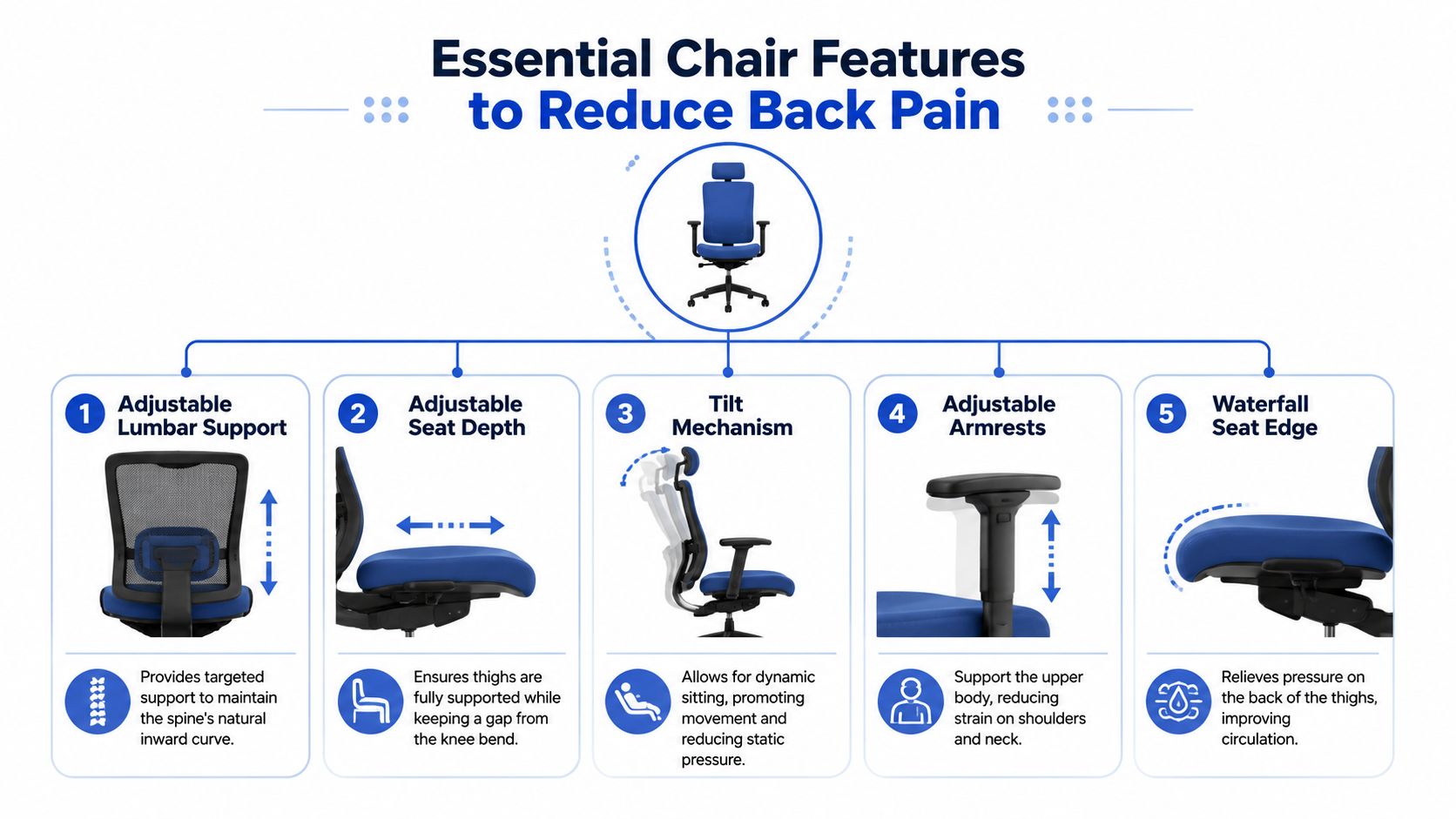
Shiny marketing terms don't tell you much. A chair helps when its moving parts let the chair match your body, not when its perceived “supportiveness” is based on looks alone. Five features matter more than the rest.
Lumbar support comes first
If you only check one specification, check this one. Adjustable lumbar support is the critical technical specification, and it needs vertical movement so it can align with the user's L1 to L5 curvature to maintain the natural lordotic curve and reduce intradiscal pressure, as outlined in this Australian ergonomic chair guide focused on lower back pain.
That sentence is technical, so let's put it plainly. The lumbar pad should meet the hollow of your lower back, not your waist, not your upper pelvis, and not somewhere in between. If it sits too high, it can push you forward awkwardly. If it sits too low, it misses the curve it's meant to support.
Common mistake: people test a chair for thirty seconds, feel a firm bulge, and assume it's “good lumbar”. Proper lumbar support should feel placed, not random.
Seat depth changes more than comfort
Seat depth often gets ignored, yet it's one of the main reasons a chair feels wrong even when the backrest seems decent. If the seat is too long, you can't get your lower back properly against the backrest without the front edge pressing into the backs of your thighs. If it's too short, your thighs aren't well supported and you tend to perch.
This matters even more for leg symptoms. Mainstream buying guides usually over-focus on lumbar pads, but generic chair advice often misses that lumbar support alone won't resolve non-lumbar pain mechanisms such as sciatica, which may need seat depth and seat angle correction instead.
That's a key distinction:
| Pain pattern | Chair feature to inspect first | Why |
|---|---|---|
| General lower back ache during sitting | Lumbar support | Helps maintain the lower back curve |
| Leg numbness or sciatica-style irritation | Seat depth and seat angle | Reduces pressure and poor loading through the thighs and pelvis |
| Tailbone discomfort | Seat angle and loading pattern | Changes pressure through the base of the pelvis |
| Upper back and neck tension | Armrests and monitor position | Reduces shrugging and forward reach |
Recline and tilt reduce static strain
Many people believe upright is best. It often isn't. A chair that lets you recline slightly and move with control is usually kinder to the spine than a rigid, fixed seat.
A gentle recline helps because it redistributes load. It also stops the common pattern where people hold themselves upright with constant trunk muscle effort until fatigue wins and they collapse into a slump. Dynamic support is better than heroic posture.
What to look for:
- A controlled backrest tilt: The chair should move with you, not dump you backward.
- A recline lock or tension control: You need options for focused work and more relaxed reading or calls.
- A stable base in recline: Your pelvis shouldn't slide forward as soon as you lean back.
A good chair doesn't force one “perfect” position. It gives you several workable positions and makes it easier to move between them.
Armrests and seat edge details matter
Armrests don't treat lower back pain directly, but they influence it. If they're too high, your shoulders rise and your upper back tightens. If they're too low or too far apart, your arms hang and your trunk leans forward toward the desk. That extra forward reach often shows up later as neck tension, mid-back fatigue, or a subtle return to slumping.
Then there's the front edge of the seat. A waterfall edge has a softer, downward-sloping front that reduces pressure on the back of the thighs. That sounds minor until you've sat for hours. Pressure in that area can make you slide forward, cross your legs, or keep shifting to escape the contact.
When you test an ergonomic chair for back pain, don't just ask, “Does it feel soft?” Ask better questions:
- Can the lumbar support move to my shape?
- Can I sit fully back without the seat front jamming my knees or thighs?
- Does the chair let me recline and still feel supported?
- Do my shoulders relax when my arms are resting?
- Can I stay in contact with the backrest without forcing myself?
Those answers tell you more than the branding ever will.
How to Evaluate and Adjust Your Ergonomic Chair
A good chair can still feel terrible if it's adjusted badly. Most discomfort I see isn't from a complete lack of features. It's from the right features being set in the wrong order.
Start with the seat and pelvis
Begin at the base. Your pelvis is the foundation for the spine above it. If the seat is wrong, every other adjustment becomes a compromise.
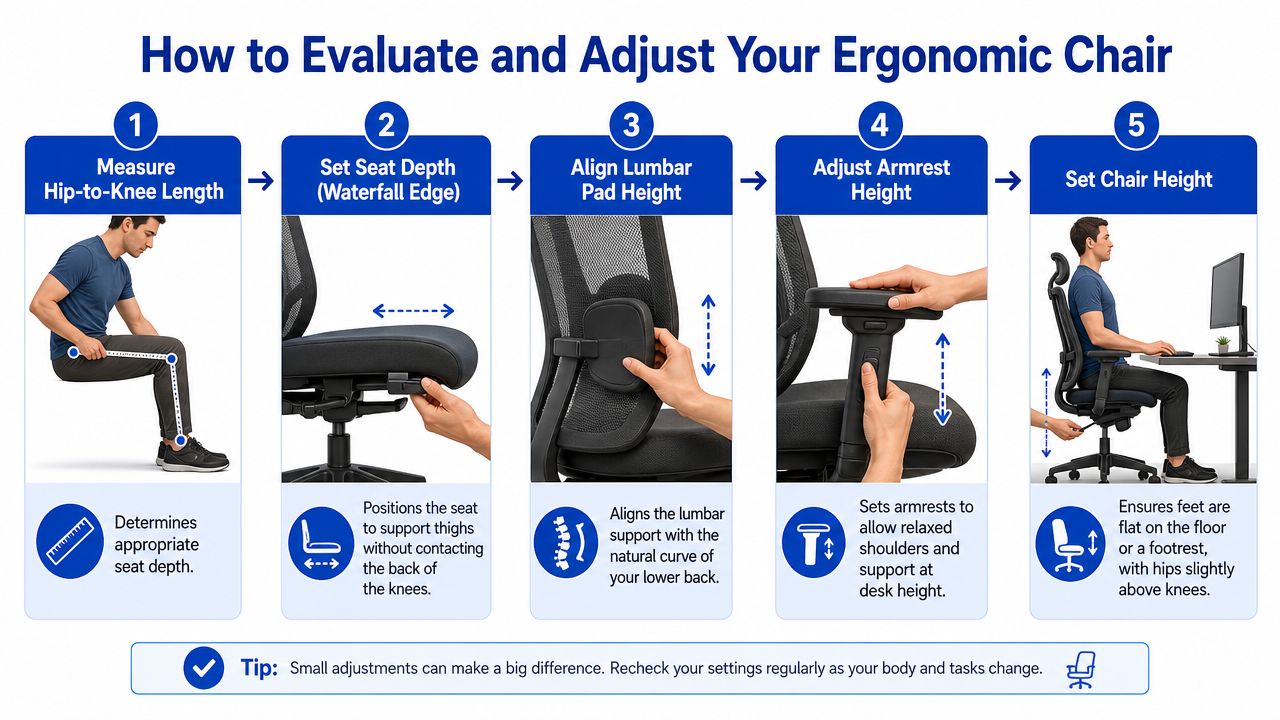
Use this sequence:
- Set chair height first. Your feet should rest flat on the floor or on a footrest. You want the pelvis settled, not dangling from the seat.
- Sit all the way back. Don't assess the chair while perching on the front half.
- Adjust seat depth. The lower back should contact the lower half of the backrest while the seat front leaves the back of the knees unpressured. Australian ergonomic guidance notes that optimal seat depth places the lower back against the backrest's lower half and uses a forward-sloping waterfall edge to avoid pressure on the posterior thighs, with micro-breaks every 30 minutes to prevent muscle fatigue.
- Notice your thigh contact. You want support through the thighs without feeling trapped at the knees.
If your chair has lots of levers and you're unsure what each one does, this short video gives a useful visual walkthrough before you start adjusting:
Then adjust the backrest and arm support
Once the seat base is right, move upward.
First, line up the lumbar support so it fills your natural lower back curve. Don't jam it to the maximum height or firmness straight away. Small changes work better because they let you feel what's happening. Sit for a few minutes after each tweak.
Then check the backrest angle. A little recline often feels better than a rigid upright posture, especially for computer work that doesn't require leaning forward. You should feel supported through the back, not suspended from your neck or shoulders.
Use this quick checklist:
- Lumbar pad position: It should meet the inward curve of your lower back.
- Backrest contact: Your back should stay in touch without effort.
- Armrest height: Let your shoulders stay relaxed rather than shrugged.
- Armrest width: Keep elbows close to the body rather than winged out.
- Desk relationship: If armrests stop you getting close to the desk, they may need lowering or narrowing.
Adjustment cue: Change one setting at a time, then work in it long enough to judge the result. If you change everything at once, you won't know what helped and what didn't.
I also suggest writing down your settings. A notebook or phone note works. Record what you changed and how your body felt that day. That simple habit saves a lot of trial and error.
Posture and Movement Strategies While Seated
Even the best chair can't protect you from staying still for too long. Tissues like variation. Good sitting isn't a frozen pose. It's a supported position with regular movement layered into it.
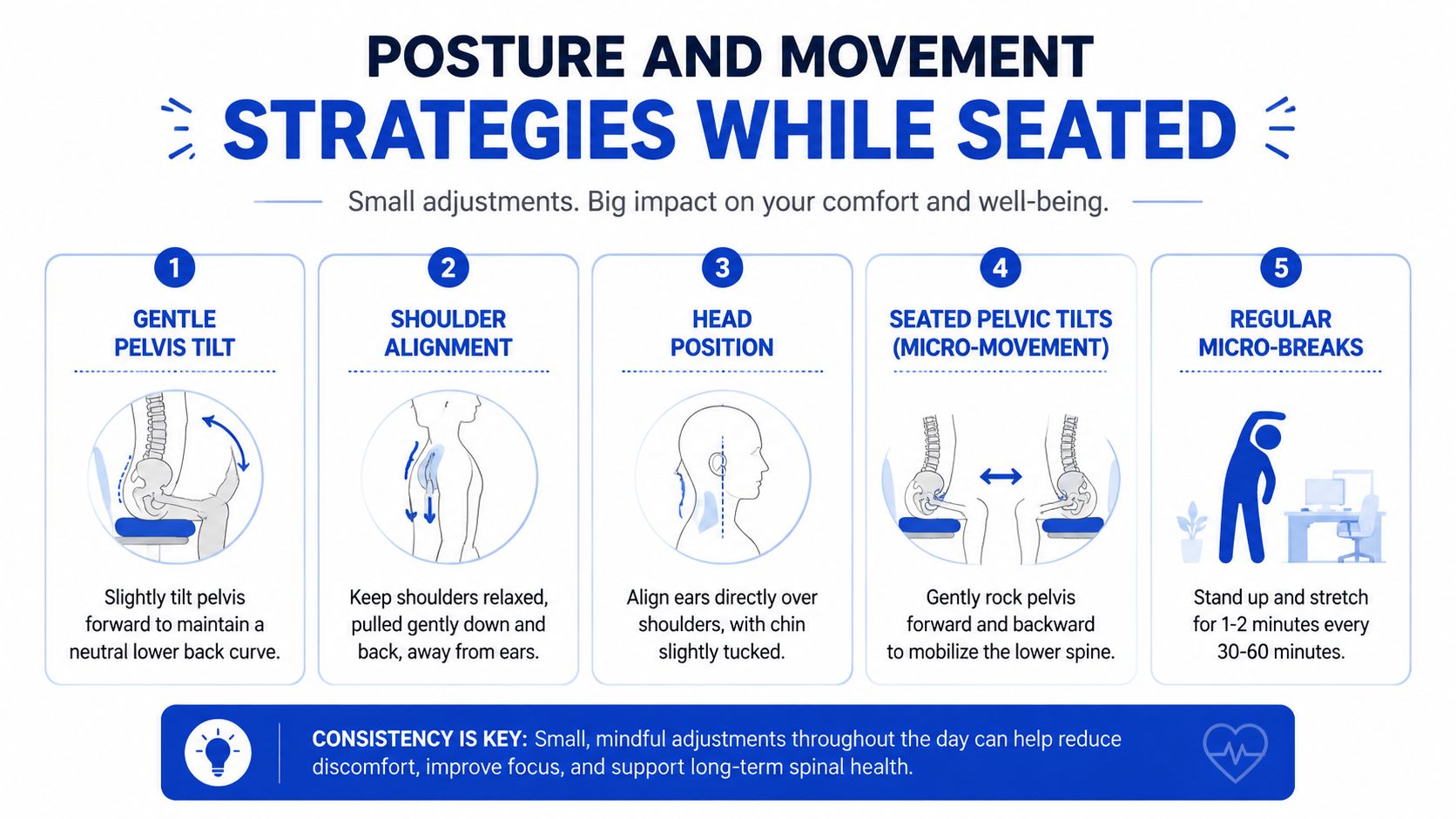
Posture cues that are easy to feel
Forget the old instruction to “sit up straight” all day. That usually creates stiffness. A more useful cue is to sit in a way that lets the chair carry you.
Australian ergonomic guidance states that a slight backrest recline of 100 to 110 degrees takes more pressure off the spine than sitting bolt upright, while adjustable lumbar support closes the gap between the lower back and chair to maintain the natural curve. In practical terms, that means a gentle supported recline is often better than trying to hold yourself vertical by effort alone.
Try these cues:
- Pelvis: Tip it very slightly forward until you feel the lower back curve return, then let the chair support that position.
- Shoulders: Let them drop away from the ears. If they creep up, your armrests or desk height may be part of the problem.
- Head: Keep the ears roughly over the shoulders, with a small chin tuck rather than a poke forward.
- Ribs: Don't flare the chest up. That creates a different kind of tension.
A simple movement routine can support this. If you need ideas for gentle home-based mobility work, this home exercise image resource is a useful visual prompt.

Small movements that stop stiffness building
Movement doesn't need to be dramatic. Tiny resets done regularly are often more helpful than a single large stretch.
Try this pattern during desk work:
- Seated pelvic rocks: Gently roll the pelvis forward and back a few times.
- Shoulder reset: Lift, roll back, and relax the shoulders without forcing them down.
- Chest opener: Place hands lightly on the desk edge and let the breastbone float forward.
- Stand and walk: Get up, change position, and take a brief lap around the room.
These aren't workouts. They're interruptions to static load.
The body usually tolerates sitting better when you stop asking one set of tissues to do the same job for hours.
If reminders help, use them. A phone alarm, watch prompt, or calendar nudge can break the habit of sitting through discomfort until it becomes pain. Many people don't need a new posture as much as they need more posture variety.
Real Examples and Case Studies of Pain Relief
Example one general lumbar strain
One office worker described a familiar pattern. The lower back felt fine early in the day, then dull and tired by late morning, with stiffness on standing. There was no pain travelling below the knee, and walking around the office usually helped.
In a case like that, I'd think first about mechanical sitting strain. The most useful change was not buying the “most supportive” looking chair. It was adjusting the existing chair so the lumbar pad met the lower back, then adding a slight recline instead of sitting rigidly upright all day. Over the next couple of weeks, comfort improved gradually because the body was no longer bracing against a flattened seated posture for hours.
Example two sciatica style leg symptoms
A remote worker had a different pattern. The back wasn't the main complaint. The bigger issue was buttock discomfort and leg symptoms that became more noticeable the longer they sat. They had already tried adding more lumbar support because online guides kept recommending it, but that didn't address the actual aggravator.
This is where nuance matters. As noted in Australian guidance, many generic chair guides overlook that lumbar support alone cannot resolve non-lumbar pain issues like sciatica, which require specific seat depth and seat angle corrections. In practical terms, sliding the seat depth, changing how the thighs were supported, and improving foot support often made more sense than pushing harder into the lower back.
Here's the pattern these two examples highlight:
| Situation | Main symptom pattern | More useful chair change |
|---|---|---|
| General sitting-related lumbar ache | Pain builds during sitting and eases with movement | Lumbar height and backrest angle |
| Sciatica-style irritation | Buttock or leg symptoms worsen with prolonged sitting | Seat depth, seat angle, and lower limb support |
That's why one-size-fits-all advice fails. The best ergonomic chair for back pain is the one adjusted to the pain mechanism you experience, not the one with the loudest marketing.
Clinical Tips from Osteopathy and Red Flags
From an osteopathic perspective, chairs matter because they influence load, movement, and muscular effort. But the body still needs mobility. If a region is already stiff, sensitive, or overloaded, even a well-fitted chair may only solve part of the problem.
What you can try at your desk
A few gentle self-care strategies can reduce the build-up of tension during the day.
Try these options:
- Soft tissue pressure with your hand or a small ball: Place it against the muscles beside the lower spine while standing against a wall. Use gentle pressure, not force.
- Hip flexor stretch: Step one foot back into a short lunge stance and let the front of the back hip open slightly. Long sitting often leaves the front of the hips feeling shortened.
- Seated trunk rotation: Turn gently toward one side, using the chair arm or desk only for light guidance.
- Breathing reset: Slow exhalation can help reduce the “holding on” pattern many people develop when they're uncomfortable.
These should feel relieving or neutral. They shouldn't provoke sharp pain, tingling, or a sense that symptoms are spreading.
A helpful clinical mindset is to treat the chair as one part of the environment, not the whole answer. If someone sits in a better position but never moves, works under stress, and braces through the abdomen and shoulders all day, symptoms often persist.
If the chair is the shoe, movement is the walking pattern. Both matter.
When a chair is not the main answer
Some pain patterns fit an ergonomic problem quite neatly. Others don't. When they don't, red flags matter.
The Australian guidance on chair use for back pain makes an important distinction. For workers whose pain builds gradually during sitting and reduces when moving, the pattern is consistent with an ergonomic cause where chair improvement is the right intervention. But severe acute pain or pain radiating below the knee requires prior physiotherapy or GP assessment rather than immediate chair replacement.
That means you should be more cautious if you have:
- Pain radiating below the knee
- Severe acute onset pain
- Numbness, weakness, or other neurological symptoms
- Symptoms that are getting progressively worse despite setup changes
- Pain that doesn't behave like a sitting problem and isn't eased by movement
In those cases, don't keep tweaking the chair endlessly while hoping for a breakthrough. Get assessed.
There's also a middle ground. Some people benefit most from combining chair changes with hands-on care, exercise guidance, or workstation changes such as a footrest, monitor adjustment, or occasional standing work. That combined approach often fits real life better than chasing a perfect chair.
A few practical decision points can help:
| If this is happening | Likely next step |
|---|---|
| Pain is mild, linked to sitting, and eases when you move | Continue adjusting the chair and building movement breaks |
| Pain improves partly but not fully | Add targeted mobility, soft tissue work, or exercise guidance |
| Symptoms include nerve-type pain or marked leg referral | Seek clinical assessment before assuming the chair is the fix |
| You feel supported but still stiff every day | Review movement frequency, desk height, and screen position |
People often ask whether a cushion or standing desk is “better” than a new chair. The honest answer is that it depends on the mechanism. A cushion may help alter pressure distribution. A standing desk may reduce total sitting time. But neither replaces the need to understand what your symptoms are responding to.
Next Steps for Comfortable Sitting
Start simple. Set your chair height, adjust seat depth so you can sit fully back, place the lumbar support where your lower back curve is, and allow a slight supported recline rather than forcing a rigid upright posture. Then add regular movement, because no chair can make stillness harmless.
Track how you feel across the next fortnight. Notice when pain starts, what eases it, and whether your symptoms stay local to the back or travel into the leg. Small improvements matter. They usually tell you that you're changing the right variable.
If your pain is clearly mechanical, a better fitted ergonomic chair for back pain can make your workday much more manageable. If symptoms are sharp, severe, or radiate below the knee, get assessed rather than trying to solve everything through equipment.
If sitting is becoming a daily source of back, neck, or joint pain, Bayside Osteopathic Health offers gentle, hands-on osteopathic care and practical guidance to help you move more comfortably. Their team works with the whole body, not just the sore spot, and can help you make sense of whether your pain is mainly ergonomic, movement-related, or something that needs closer assessment.