
Most advice about preventing back pain at work starts with a chair, a lumbar roll and instructions to “sit up straight”. That advice is incomplete. Your back usually doesn't need one rigid position. It needs a workstation and workload that allow regular movement, sensible loading and enough recovery.
Australian workplace evidence supports that broader view. Safe Work Australia recorded 360,180 serious work-related musculoskeletal disorder claims between 2009–10 and 2013–14, representing 60% of all serious workers' compensation claims during that period. Approximately 35% of those serious musculoskeletal claims involved the back. Safe Work Australia's compensation data also shows why a single lifting lesson or posture correction can't carry the whole prevention plan.
As an osteopath, I see desk workers who have bought an expensive chair but still spend hours motionless, warehouse workers who were taught to lift “perfectly” but never get task variation, and remote workers whose symptoms worsen during intense, poorly organised workdays. The practical answer is to manage the full pattern: force, repetition, duration, fatigue, stress, movement and recovery.
Table of Contents
- Why Posture Alone Won't Fix Workplace Back Problems
- Set Up Your Workstation for Movement Not Stillness
- Build a Sit-Stand Routine That Actually Reduces Pain
- Movement Breaks and Gentle Stretches Between Tasks
- Lifting, Reaching and Physically Demanding Tasks
- Recovery Sleep and Stress Outside Work Hours
- Your Weekly Back-Smart Routine and When to Seek Help
Why Posture Alone Won't Fix Workplace Back Problems
The popular prescription is simple: find the correct posture and hold it all day. That approach can turn a helpful workstation adjustment into another source of tension. Someone may maintain an elegant neutral spine and still become sore after hours without changing position. Someone else may slouch briefly, move, stand and walk, then finish the day comfortably.
Australian evidence challenges the idea that one posture protects everyone. Workplace guidance reports insufficient evidence that awkward postures, standing, walking or heavy work alone reliably cause low back pain. It also finds no evidence that lumbar supports or education by themselves prevent low back pain. Safe Work Australia's biomechanical demands evidence supports managing exposure instead of policing alignment.

Why accumulated load is often the problem
Back pain can develop when several moderate demands arrive in the same day. You might sit through a long morning, hurry to collect stock, lift from a low shelf, commute home and sleep poorly. None of these activities must be “bad” by itself, yet their combined demand can exceed your current capacity.
The compensation data shows the scale of the workplace burden, not one proven cause. Prevention should address physically demanding roles, repetitive tasks, load handling, recovery time and early reporting. Removing every lift is unrealistic, and eliminating lifting altogether has not clearly reduced incidence.
Practical rule: Don't ask, “What is the perfect posture?” Ask, “How can I reduce unvaried loading and give my body more opportunities to move and recover?”
What works better than a posture checklist
A useful prevention plan combines task design, worker involvement, movement variety, mechanical assistance where appropriate, physical conditioning and early symptom management. A chair can make desk work more comfortable. It cannot compensate for excessive repetition, limited control over breaks or demands that remain unmanageable.
The aim is a working day that can adapt. Change positions before discomfort builds, vary demanding tasks where possible, and treat early symptoms as information rather than a reason to chase a stricter posture. That approach keeps sitting, bending and lifting in proportion, while giving the back more chances to recover.
Set Up Your Workstation for Movement Not Stillness
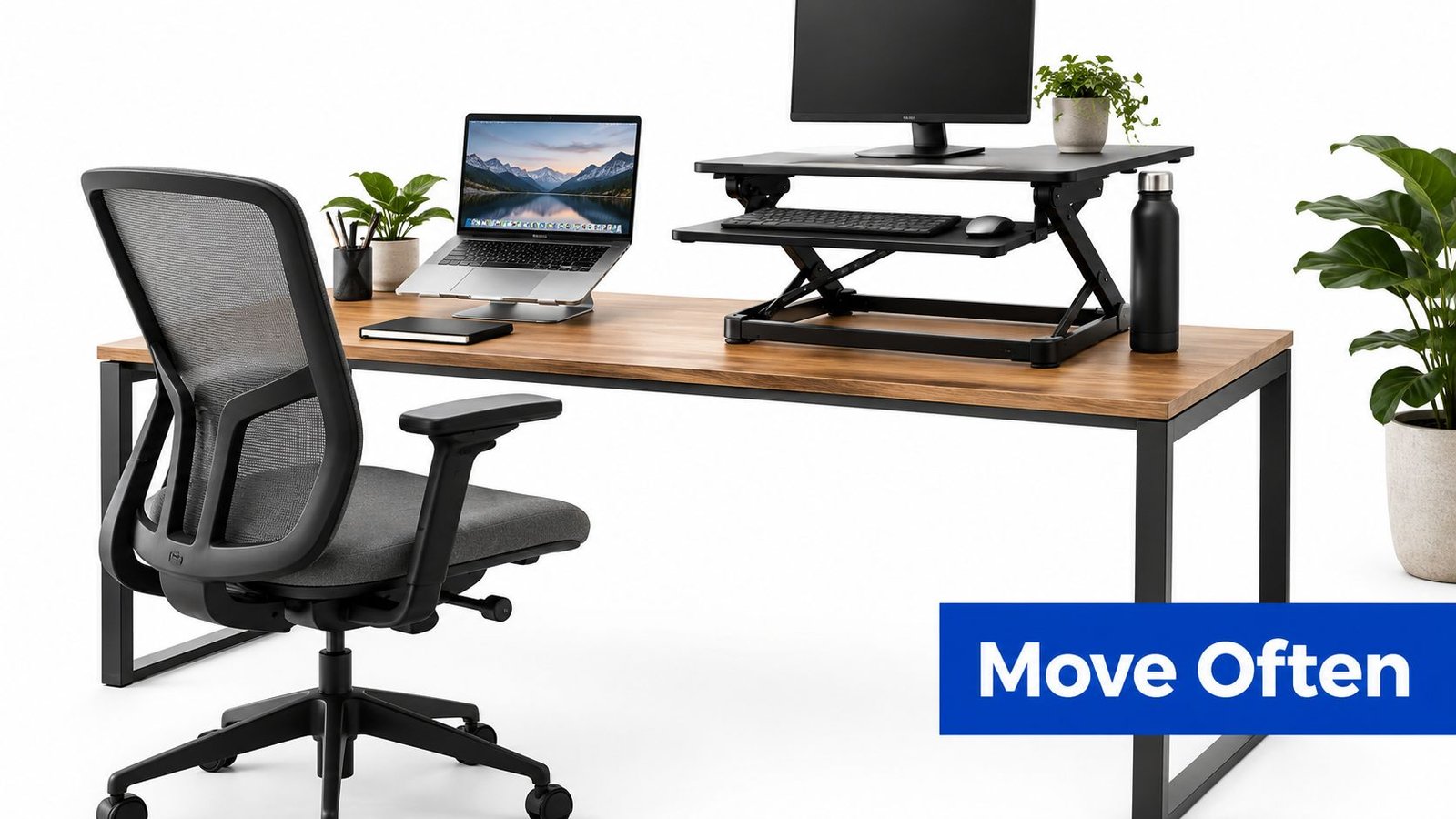
A workstation should support comfortable movement, not lock you into a posture. Set the main equipment so your shoulders can relax and your back has reasonable support, then keep enough freedom to change position throughout the day.
Place the monitor directly in front of you, with its top approximately at eye level. For extended laptop work, raise the laptop and connect a separate keyboard and mouse. Keep the screen close enough to read without repeatedly leaning forward, while allowing your head and neck to move naturally.
Make the desk fit the task
Keep the keyboard and mouse close enough for your elbows to stay near your torso. If your shoulders rise while typing or you reach across the desk for the mouse, move the equipment closer. For phone work that involves writing, use a headset or speaker function instead of holding the handset between your shoulder and ear.
Support your feet on the floor or a footrest. Adjust the chair so its back support helps you without pushing you into an exaggerated upright position. The chair should make position changes easier, not require you to hold one shape.
Use this five-minute workstation check:
- Screen: Is it directly ahead, with the top near eye level?
- Reach: Can you use the keyboard and mouse with your elbows close to your sides?
- Feet: Are your feet supported rather than dangling?
- Phone: Can you talk and type without twisting your neck?
- Movement: Can you stand, walk or change position without interrupting the task?
The setup also needs to match the job. Repetitive computer work, long periods without a break and poorly arranged equipment can keep the same tissues loaded. This workplace ergonomics image provides a useful visual prompt, but furniture alone does not address the way work is organised.

Build movement into the layout. Keep frequently used items within a comfortable reach, place less urgent items where you need to stand or walk, and avoid arranging the desk so every task happens in one fixed position. A small change in equipment placement can create more natural variation without disrupting concentration.
Check the workstation after a few hours of real work, not only while sitting still for an assessment. If symptoms appear, adjust the task, position or duration rather than chasing a stricter posture. The goal is a desk that supports comfortable work and regular movement.
Build a Sit-Stand Routine That Actually Reduces Pain
A standing desk isn't automatically a solution. Standing still for long periods can just replace one sustained load with another. The useful question is whether you can alternate positions consistently, without waiting until pain forces you to move.
A 2025 randomised trial involving 56 desk-based workers with low-back pain compared a fixed schedule of 30 minutes sitting followed by 15 minutes standing with personalised switching. After three months, the fixed schedule reduced worst pain by 1.33 points out of 10 and average pain by 0.83 points, with higher adherence than the personalised approach. The Griffith University trial was small and short-term, so it doesn't prove that one routine suits everyone. It does challenge the assumption that “listen to your body” always produces the most consistent behaviour.
Fixed routine or self-selected switching
| Approach | Potential advantage | Main limitation |
|---|---|---|
| Fixed switching | Removes the decision and creates a repeatable habit | May need adjustment for meetings, fatigue or task demands |
| Personalised switching | Gives you flexibility and may suit fluctuating symptoms | Easy to postpone movement until discomfort is already high |
| Standing whenever pain appears | Responds to symptoms in the moment | Can lead to long periods of standing or inconsistent practice |
For a practical starting point, use a timer, calendar automation or a smart speaker reminder. Sit for 30 minutes, stand for 15 minutes, then repeat if the routine remains comfortable. Use standing periods for reading, phone calls or short administrative tasks. Use sitting for concentrated keyboard work if standing makes you brace through your shoulders.
Don't stand all day to prove you're taking prevention seriously. Keep the legs relaxed, change weight between feet and walk briefly when possible. Meetings can become movement opportunities if you take a phone call while walking, use a standing option for part of a video meeting or walk to speak with a colleague rather than sending another message.
If your pain is persistent, worsening or accompanied by neurological symptoms, a sit-stand schedule is not a substitute for assessment. The routine is a tool for reducing prolonged exposure, not a diagnosis or treatment for every cause of back pain.
Movement Breaks and Gentle Stretches Between Tasks
Movement breaks work best when they are short enough to repeat and linked to something you already do. Waiting for a large empty block in the calendar usually means the break never happens. Instead, attach movement to finishing a report, ending a call, making tea or sending a client update.
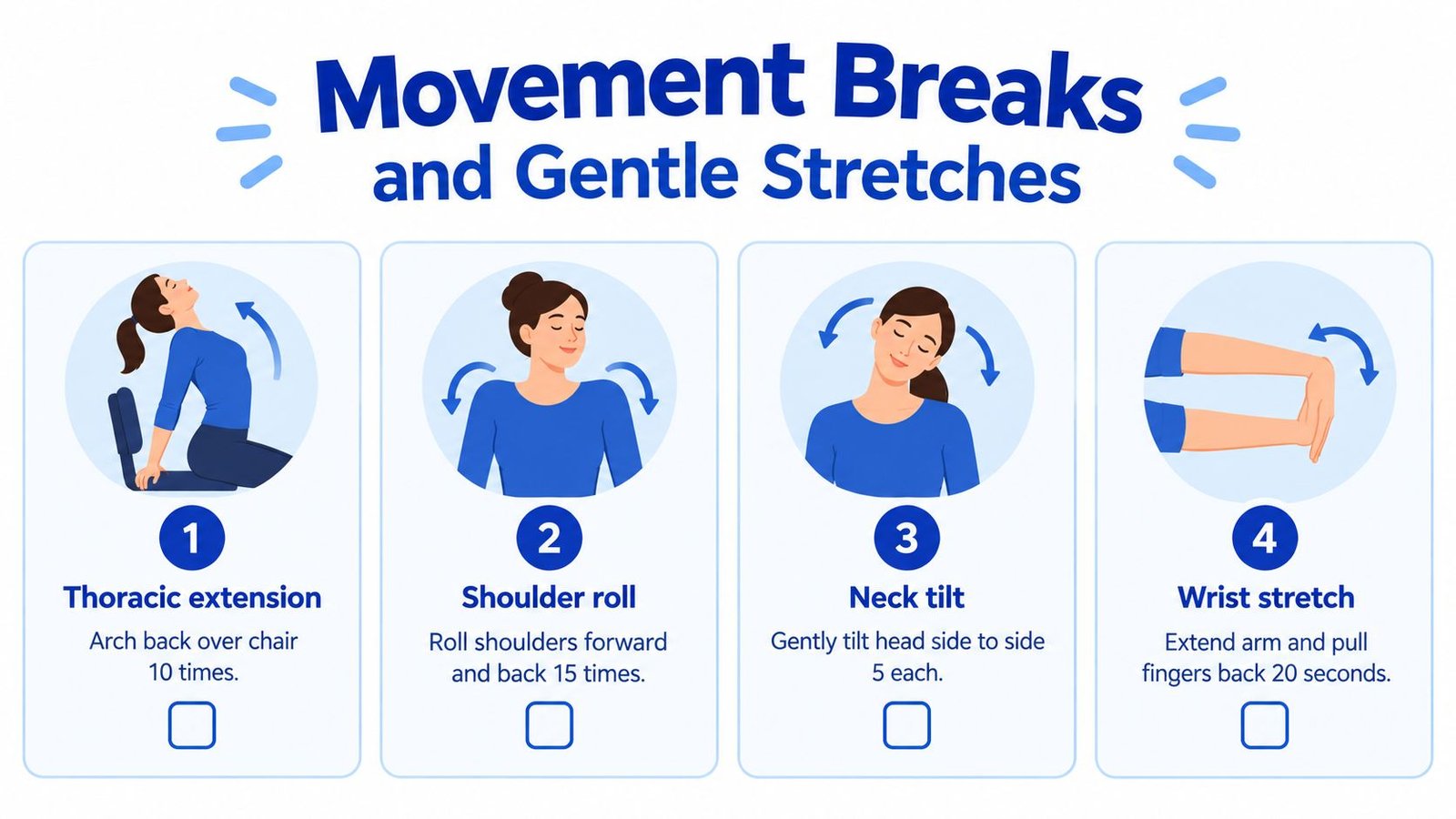
A two-minute desk reset
Move gently and stay below sharp or escalating pain. The point is to change the areas that have been held still, not to force a deep stretch.
- Thoracic extension: Sit near the front of the chair, place your hands behind your head and gently extend your upper back over the chair back. Return to neutral and repeat slowly.
- Shoulder rolls: Roll both shoulders forwards and backwards, keeping the neck relaxed. Let the movement become smaller if it causes discomfort.
- Neck tilts: Allow one ear to move towards the same-side shoulder, then return to centre and change sides. Don't pull on the head.
- Gentle rotation: With feet supported, turn your trunk comfortably to one side, return to centre and repeat on the other side.
The desk movement visual can sit beside your monitor as a reminder. You can also stand, walk to refill water or take the next internal call away from the desk. These changes often matter more than performing an intense stretch once at day's end.

Movement should feel like relief, not punishment. If a stretch causes sharp pain, spreading symptoms or increasing discomfort that doesn't settle, stop and choose an easier movement or seek advice.
A movement break doesn't need to interrupt productivity. Read a document standing, walk during an audio-only meeting, or perform a few shoulder rolls while a file loads. If symptoms repeatedly return at the same task, record what happens. The pattern may point to screen height, reach distance, workload, stress or insufficient recovery rather than a lack of flexibility.
Lifting, Reaching and Physically Demanding Tasks
Back pain prevention is rarely about finding one perfect lifting posture. A courier may collect a parcel from the floor, turn towards a trolley and carry it across a loading area. A warehouse worker may reach into a low shelf repeatedly, while a healthcare worker may help transfer a patient when suitable equipment or another colleague is unavailable. These situations differ, but the practical priorities are consistent: manage force, limit awkward repetition, use assistance and report symptoms early.
Labourers recorded the highest frequency of serious musculoskeletal claims in the Australian compensation dataset, at 11.3 claims per million hours worked, compared with 4.2 across all employees. Safe Work Australia's occupational data supports giving physically demanding roles particular attention. The figures do not make every lift dangerous. They show how repeated exposure, load, pace and recovery shape risk.

Use technique as one tool, not the entire plan
Before lifting, reduce the demand if you can. Bring the load closer, clear the route, raise the working height or use a trolley, hoist or other mechanical aid. For an awkward, unstable or heavy object, arrange a team lift or ask for assistance rather than relying on effort alone.
During the lift, keep the load close and move your feet instead of twisting beneath it. Use a smooth effort suited to your capacity. The goal is not to freeze your spine or hold one “perfect” shape. A controlled lift is more practical than rigid technique performed while you are rushing or fatigued.
Repetitive work needs variation. Change the height or direction of tasks where possible, alternate stock handling with less demanding duties and take brief recovery pauses. Move closer to a shelf instead of repeatedly reaching at arm's length, then reposition the item before carrying it.
Education on lifting technique alone has not shown a clear preventive benefit, and removing lifting altogether is rarely workable. Better results come from combining training with suitable equipment, adequate staffing, task variation, worker participation and early management. Technique supervision helps only when the organisation also addresses an unrealistic pace or equipment that is unavailable.
Recovery Sleep and Stress Outside Work Hours
Your working day doesn't end when you close the laptop or leave the warehouse. Sleep, stress, commuting, caring responsibilities and evening activity all influence how much capacity you bring to the next shift. Prevention works better when you treat recovery as part of the workload rather than an optional extra.
Choose a sleep position that lets you relax rather than chasing a universal “correct” arrangement. Side-lying with a pillow between the knees may feel comfortable for some people. Others prefer lying on their back with support under the knees. A mattress or pillow that leaves you repeatedly waking stiff deserves attention, but changing equipment won't fix an overloaded work pattern on its own.
Reduce the invisible load
WorkSafe ACT identifies low control, high demands and poor supervisor support as interacting with physical workplace risks. That matters for desk workers as much as for manual workers. A tense, deadline-heavy day can increase muscle guarding, reduce breaks and make ordinary movements feel threatening.
Raise practical questions during a review:
- Can deadlines be adjusted when symptoms flare?
- Can repetitive tasks be rotated?
- Who covers the phone while you take a movement break?
- Is the equipment you need available and maintained?
- Can your supervisor help prioritise competing demands?
A useful script is: “I'm noticing symptoms after prolonged computer work. Could we review the workstation, break pattern and workload so I can keep working safely?” This turns a vague complaint into a specific workplace discussion.
SafeWork NSW reported that musculoskeletal disorders made up 52% of serious workplace claims from 2018–19 to 2022–23, with an average of 20 weeks of lost work per injured person. The Australian workplace prevention guidance supports proactive hazard identification, worker involvement and regular reassessment.
After work, gentle walking or mobility can be more useful than complete rest if movement feels comfortable. Normal post-exercise soreness tends to settle, while pain that progressively worsens, spreads or changes your strength and sensation deserves attention. Stress management doesn't need to be elaborate. A quiet walk, paced breathing, reduced late-night work messages and a consistent wind-down routine can all help you recover.
Your Weekly Back-Smart Routine and When to Seek Help
A prevention plan should survive a busy week. Keep it simple enough for a home office, a shared workplace or a physically active job, then adjust it when symptoms, duties or fatigue change.
A routine you can repeat
At the start of each workday, place the screen directly ahead, bring the keyboard and mouse close, support your feet and remove unnecessary reaching. Decide when you'll alternate sitting and standing before work becomes absorbing.
During desk work, use a pre-planned sit-stand pattern if it suits you, and attach brief movement to natural task boundaries. Walk during suitable calls, change position before discomfort becomes intense and avoid turning a movement break into another demanding exercise session.
During physical work, check the route and load before lifting, use available equipment, keep awkward loads close and ask for assistance when needed. Rotate repetitive duties and report recurring symptoms while you can still participate in normal work.
Outside work, protect recovery. Use comfortable sleep support, take an easy walk or perform gentle mobility, and notice whether stress or poor sleep consistently changes your symptoms. A short daily note about tasks, pain behaviour, sleep and recovery can reveal patterns without making you monitor every sensation.
The right time to seek professional assessment is when symptoms don't follow a reassuring pattern. Arrange an evaluation if you have:
- Numbness, tingling or weakness, particularly if it is spreading or affecting function.
- Pain that wakes you at night or keeps escalating rather than settling.
- Symptoms that persist or worsen despite consistent changes to workload, movement and recovery.
- Pain after a specific incident, such as a fall, collision or sudden lifting event.
- Recurring symptoms that limit work, sleep, walking or ordinary daily activities.
Don't wait for a perfect routine. Tomorrow, choose one concrete change, such as moving your mouse closer, setting a sit-stand reminder or walking during one suitable call. If the problem keeps returning, this chronic pain resource may help you think about symptoms as a pattern that deserves assessment rather than a failure of willpower.

Bayside Osteopathic Health offers gentle, hands-on osteopathic care, movement advice and personalised workstation guidance for people managing work-related back, neck and joint discomfort. Visit Bayside Osteopathic Health to discuss your symptoms and create a practical plan for moving and working with greater confidence.