
You finish the workday with a dull ache in your wrist, a tight forearm and shoulders that feel permanently lifted towards your ears. By Tuesday, the discomfort has returned, even though it eased over the weekend. This pattern is common, but it isn't something you have to accept as bad luck. Repetitive strain injury prevention is primarily a movement and workload problem, not a search for one perfect keyboard, stretch or posture.
Repetitive strain injury, often discussed within the broader category of work-related musculoskeletal disorders, can develop when repetition, sustained postures and low-force loading continue without enough variation or recovery. It can affect office workers, tradespeople, healthcare staff, drivers, creatives and people working from improvised home desks. The useful question isn't whether your wrists are straight. It's whether the way you work gives your tissues enough change, capacity and recovery.
Table of Contents
- Why Repetitive Strain Injury Is Worth Preventing Early
- A Layered Plan That Actually Reduces Risk
- Setting Up a Workstation That Protects You
- Break Schedules and Movement Variety That Stick
- Tools and Adaptive Aids Worth Your Money
- When to Book an Osteopathic Assessment
- Putting It All Together This Week
Why Repetitive Strain Injury Is Worth Preventing Early
Early symptoms are easy to dismiss. Forearm tightness after typing becomes part of the workday. A stiff neck gets blamed on a busy week. Tingling in the fingers is managed by shaking the hand, then continuing with the same task. That response leaves the exposure unchanged while irritation can become more persistent.
Australian workplace data shows why early prevention deserves attention. Safe Work Australia reports 360,180 serious musculoskeletal disorder claims between 2009–10 and 2013–14, representing 60% of all serious claims over that five-year period (Australian RSI and MSD information). Musculoskeletal disorders are also identified as the leading cause of workers' compensation claims in Australia, accounting for more than half of all claims. RSI affects more than people who type all day. Repetitive movement, fixed postures and low muscle loading occur in office, manual and hybrid work.
Early action gives you more options. Occasional symptoms may improve when you change the task, vary your position and gradually rebuild tolerance before work becomes consistently painful. Persistent symptoms can still respond to workplace changes, but they may also require clinical assessment, graded exercise and a deliberate reduction in workload.
The three loads that matter
Repetition is the most obvious driver, but frequency does not explain everything. Clicking, gripping, scanning, lifting, reaching or typing becomes more demanding when the same action continues with few opportunities to change task or position.
Sustained low-force loading is less noticeable. Holding the head forward, keeping a shoulder slightly raised, resting the forearm in one position or maintaining the wrist near its end range can fatigue muscles and irritate sensitive tissues, even when no single movement feels strenuous.
Psychosocial workload also affects risk. Time pressure, limited control over task order, inadequate staffing and the sense that breaks are not allowed can increase muscle tension and reduce recovery. SafeWork NSW links psychosocial hazards with increased MSD risk, supporting prevention that combines physical redesign, workload management and worker consultation (SafeWork NSW guidance on managing MSDs).
Posture matters, but it is not a moral test or a complete diagnosis. A relaxed posture held for too long can be as unhelpful as an awkward posture used briefly. Assess frequency, duration, force, position and recovery, then change the combination that is driving your symptoms.
| Metric | Figure / detail |
|---|---|
| Serious MSD claims in Australia | 360,180 between 2009–10 and 2013–14, 60% of all serious claims |
| Serious MSD claims frequency | 4.2 claims per million hours worked over 2009–10 to 2013–14 |
| Estimated economic cost | More than A$24 billion in 2012–13 |
| Median work time lost | 6 weeks for serious MSD claims in 2015–16 |
These figures are summarised in an Australian RSI prevention overview.
Prevention is easier before pain becomes your main feedback system. Identifying the task, posture or workload problem early leaves more practical choices for reducing strain and restoring capacity.
A Layered Plan That Actually Reduces Risk
Australian workplace guidance uses a hierarchy of controls, and it gives you a better decision rule than buying another ergonomic accessory. Start with the strongest available change, then add lower-level strategies to support it.
- Eliminate: Remove the repetitive task where reasonably practicable. Automate a manual process, stop an unnecessary data transfer or remove a handling step.
- Substitute: Replace a demanding tool, workflow or task with one that reduces repetition or awkward positioning.
- Engineer: Change the physical setup. Adjust the desk, screen, chair, input devices, handles or mechanical aids.
- Administer: Rotate tasks, plan recovery, manage deadlines, consult workers and provide task-specific training.
- Support personal habits: Use education, self-monitoring and symptom awareness to reinforce the higher-level controls.
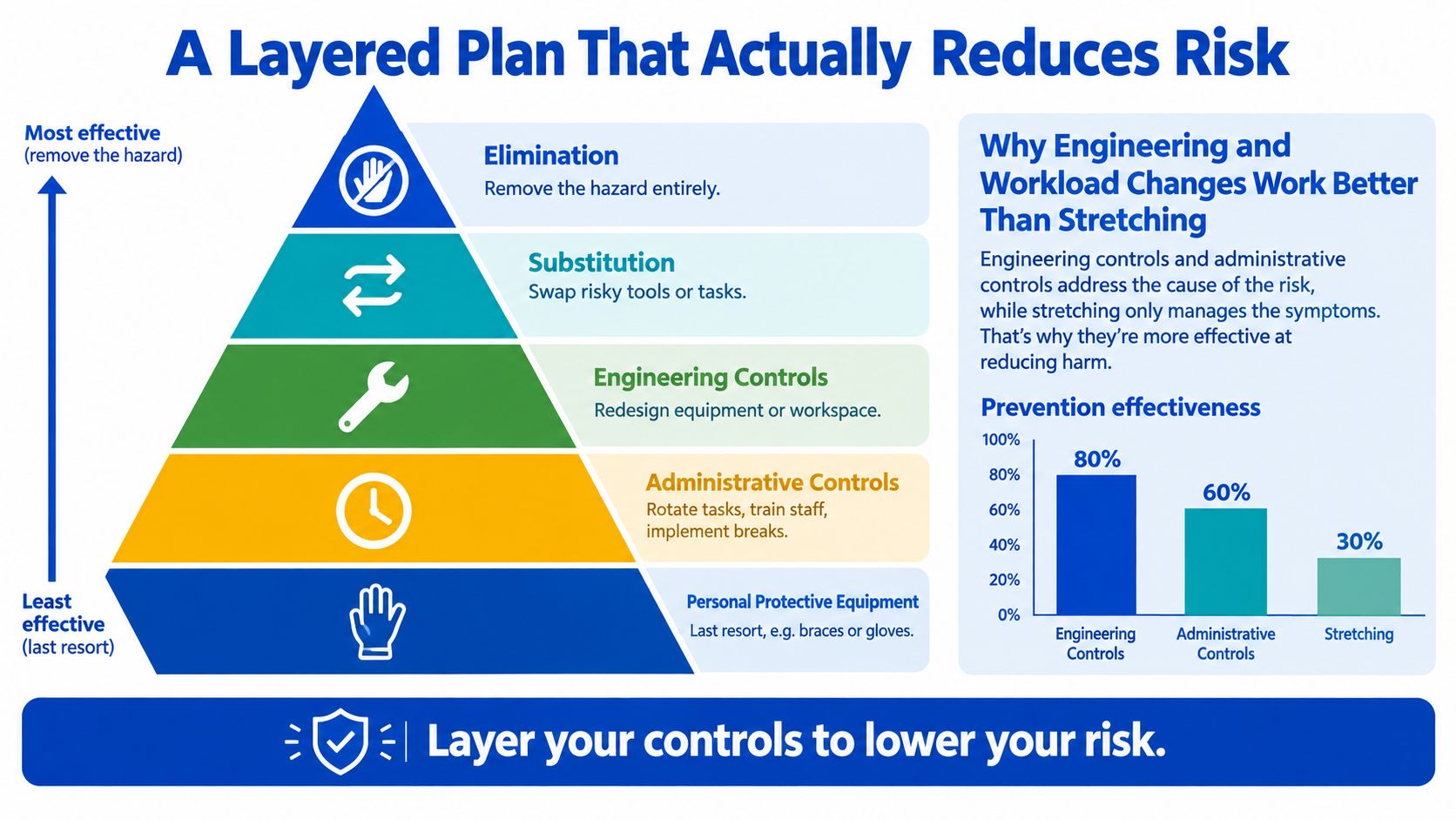
A vertical mouse may reduce a particular forearm position, but it won't solve a role built around uninterrupted clicking. Stretching can feel relieving, but a walk or task change often creates more useful contrast than repeatedly pulling on already-irritable tissue. Treat equipment and exercises as layers, not substitutes for redesign.
Practical rule: Fix the task before trying to fix the person.
Setting Up a Workstation That Protects You
Start with the chair, because every other adjustment depends on your sitting height. Set it so your hips sit slightly above your knees, with both feet supported. The lumbar support should fill the natural curve of your lower back without forcing you into a rigid pose.
Place the monitor around an arm's length away, with the top of the screen roughly at eye level. You should be able to read without pushing your chin forwards. If you use two screens, keep the screen you use most directly in front of you and turn your whole body when you need the other one.
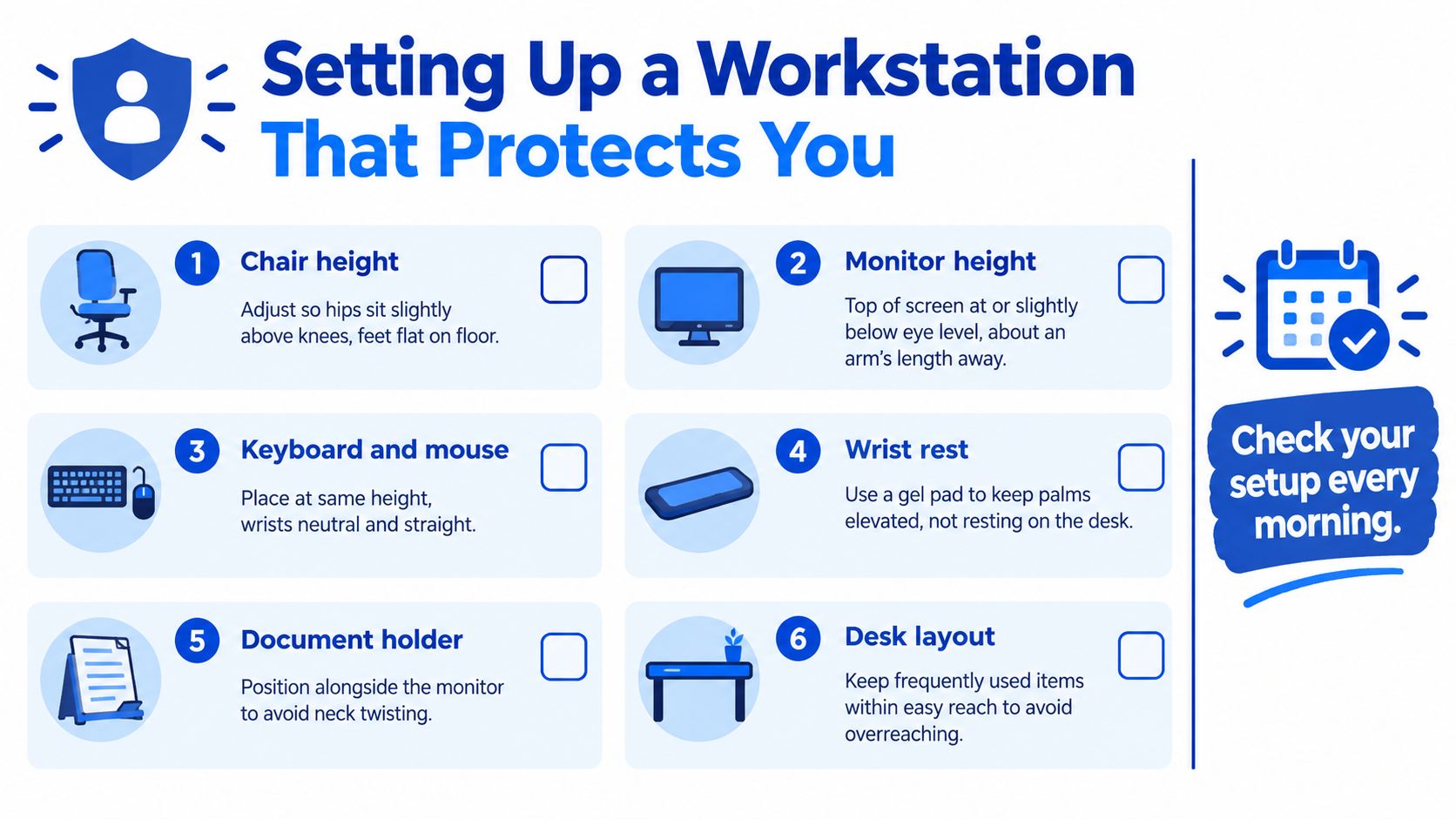
Your keyboard should sit close enough that your elbows remain near 90 degrees and your forearms can stay broadly parallel to the floor. Keep the mouse beside the keyboard rather than reaching out to the side. During typing, aim for neutral wrists, with the movement coming from the fingers and forearm rather than sustained wrist extension.
A laptop alone creates a compromise. If you raise the laptop screen, the keyboard rises too high. If you keep the keyboard at a comfortable height, your neck bends down. For regular laptop work, use a separate keyboard and mouse with a laptop stand or a stable riser. For a visual reference, see this posture and corporate ergonomics guide.

Forearm support usually matters more than a thick gel wrist pad. Let the forearms rest lightly on the desk or arm supports while leaving the wrists free during active typing. A wrist rest can be useful during pauses, but it shouldn't force the wrist upwards as you type.
Reduce glare so you don't lean towards the screen. Keep frequently used items within easy reach, use a headset for phone-heavy work and avoid cradling the handset between your neck and shoulder.
A short visual demonstration can help you check the broad arrangement of your desk:
Break Schedules and Movement Variety That Stick
The most useful break is usually the one that changes your position and task. A single stretch performed at the same desk doesn't cancel out hours of repetitive input. Prevention works better when you create posture contrast, moving between sitting, standing, walking, reaching and looking away from the screen.
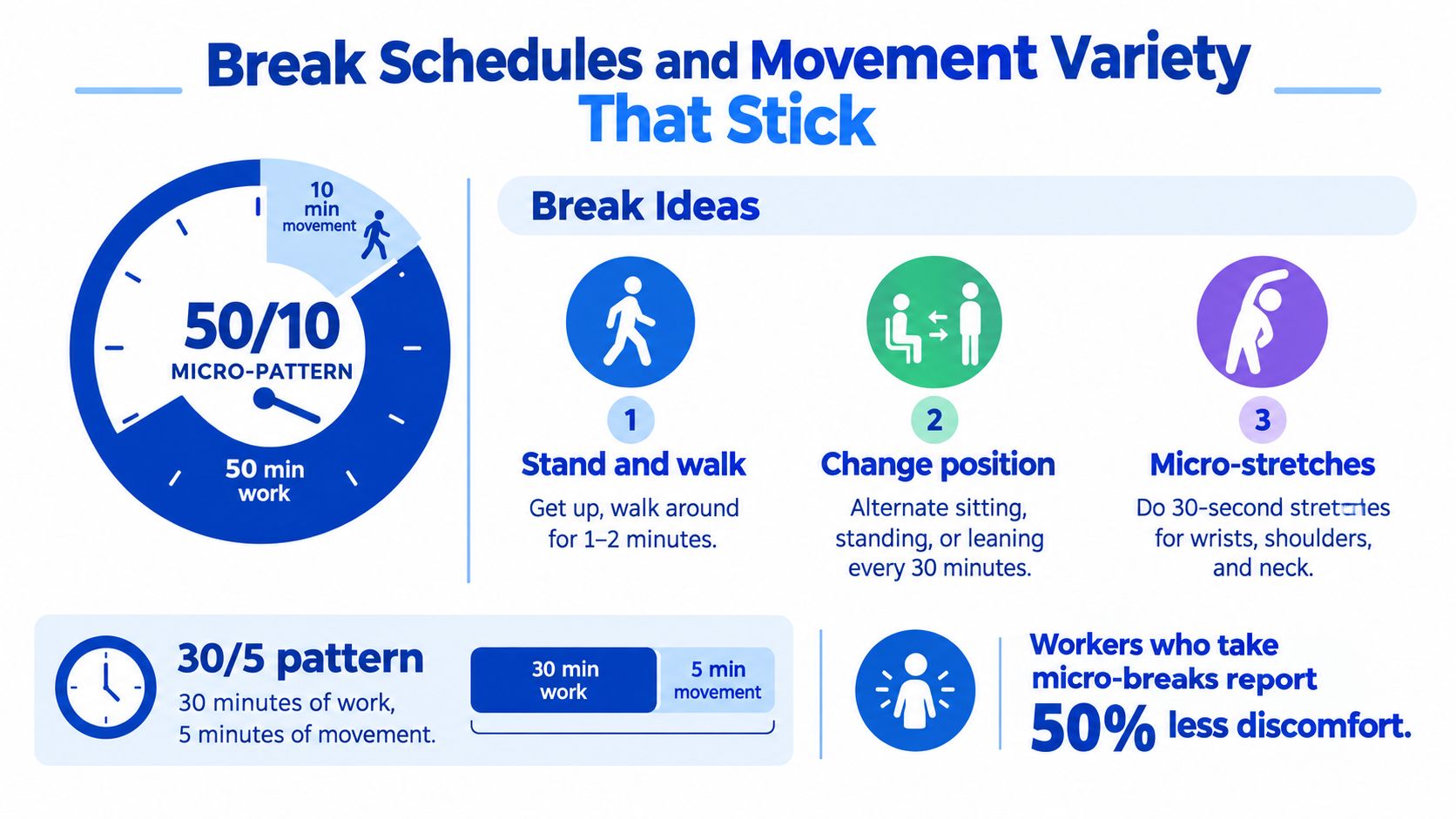
Try a simple 30/5 pattern, working for 30 minutes and then taking 5 minutes to move, or a 50/10 pattern, working for 50 minutes followed by 10 minutes away from the task. These are starting structures, not medical thresholds. If your symptoms build well before the timer, change position sooner.
Use a small rotation rather than a long routine:
- Change position: Alternate sitting, standing or leaning during the day.
- Move the shoulders: Roll them gently, then let the arms hang and relax.
- Free the neck: Make a small chin tuck without forcing the head backwards.
- Move the upper back: Rotate through the upper spine gently, especially after screen work.
- Walk briefly: Refill your water, use the printer or take the longer route to a meeting.
- Share phone time: Stand for one planned call and pace during suitable phone meetings.
The point isn't to stretch harder. It's to interrupt the same load before it accumulates. Put one movement cue into an existing routine, such as standing whenever you take a phone call or walking after sending a particular report. A habit attached to a work event is more dependable than a reminder that asks you to stop without a clear reason.
See this movement and rehabilitation visual for the general idea of keeping movement active and varied.

Tools and Adaptive Aids Worth Your Money
Ergonomic products can help, but only when they address a specific exposure. The wrong purchase creates a polished workstation while the repetitive workload stays exactly the same.
A split or contoured keyboard can be worthwhile for a heavy typist whose symptoms are aggravated by keeping the hands angled towards each other. It may reduce the amount of sideways wrist positioning required, but it also has an adjustment period and isn't essential for everyone. A vertical mouse can help a person who feels worse with the forearm rotated in a conventional mouse position, though some users find it less precise for detailed work.
Sit-stand desks are useful when they make position changes convenient. They aren't protective because they can move up and down. If you stand rigidly for long periods, or leave the desk at one height all day, you've replaced one sustained position with another.
Wrist rests are often misunderstood. They can support the heel of the hand while you pause, but resting heavily on them during typing can restrict natural movement and encourage wrist extension. Footrests, document holders and monitor arms are similarly problem-specific. A footrest can help when your feet don't reach the floor after adjusting the chair, a document holder can reduce repeated neck rotation, and a monitor arm can make screen height easier to change between users.
| Tool | Verdict | Best for |
|---|---|---|
| Split keyboard | Often useful, but not universal | People with heavy typing demands or symptoms linked to hand angle |
| Vertical mouse | Worth trialling before buying | People aggravated by a conventional forearm position |
| Sit-stand desk | Helpful when used for regular variation | Workers who can change position throughout the day |
| Wrist rest | Limited during active typing | Supporting the hand during pauses |
| Footrest | Practical when feet aren't supported | Short users or desks that can't be lowered |
| Document holder | Low-cost, targeted aid | Roles involving frequent reading and typing |
| Monitor arm | Convenient rather than essential | Shared workstations or screens needing regular adjustment |
Three useful symptom checks
The patterns that turn up early include morning stiffness that takes more than a few minutes to ease, forearm tightness that builds through the afternoon, intermittent tingling or numbness in the fingers, and discomfort that improves on weekends before returning with the workweek. None of these patterns proves a particular diagnosis, but they deserve attention rather than dismissal.
Use three questions:
- When does it start? During a task, overnight or first thing in the morning?
- How quickly does it settle? Does changing position help promptly, or does the discomfort remain?
- What can you no longer do comfortably? Notice grip, mouse control, typing accuracy, lifting and sleep.
Think of the result as a practical guide. Green means symptoms are manageable and settle with workload or workstation changes. Amber means symptoms recur and need a structured plan rather than random adjustments. Red means pain is escalating, weakness is present, sleep is being disturbed or hand function is changing. Amber is a good time to arrange professional guidance. Red needs prompt assessment.
When to Book an Osteopathic Assessment
Self-management is reasonable when symptoms are mild, clearly linked to a modifiable task and improving after you change that task. It becomes less suitable when discomfort persists beyond two weeks despite sensible ergonomic changes, or when symptoms interfere with ordinary hand use.
Book an assessment promptly if you notice:
- Numbness or weakness: Tingling that persists, spreading altered sensation or a hand that feels less reliable needs assessment.
- Functional change: Reduced grip, dropping objects or difficulty controlling a mouse or fine movement shouldn't be managed by equipment alone.
- Night disturbance: Pain that repeatedly interrupts sleep suggests the problem needs more than a desk reset.
- Worsening symptoms: Escalation despite reducing exposure is a reason to stop experimenting and seek advice.
Some presentations also need a GP or specialist review, particularly after an injury, with suspected nerve entrapment, or when symptoms suggest a systemic inflammatory condition. Osteopathy can complement GP and physiotherapy care, but it shouldn't replace medical assessment when the pattern calls for it.
At Bayside Osteopathic Health, an assessment would usually begin with the history of your symptoms, work demands, previous injuries, sleep and general health. The practitioner then reviews posture and movement, examines the painful region and considers contributing areas such as the neck, shoulder girdle, thoracic spine, elbow and forearm. The management plan may combine hands-on treatment, movement or strengthening exercises, and practical workplace advice.
That broader assessment matters because the painful area isn't always the only area carrying the problem. A wrist complaint may be influenced by shoulder position, neck sensitivity, grip habits or the way deadlines keep the arm tense for hours. A useful plan should identify the exposure, make it manageable and give you a small number of actions you can repeat.
For a related visual reference, see this neck pain and osteopathy resource.

Keep the supporting habits small
Sleep positioning can reduce overnight irritation. Use enough pillow support to keep the neck comfortable rather than forcing it into a fixed angle. Hydration and regular general activity support overall tissue tolerance, but they won't cancel out a poorly designed task.
A short strength routine can support prevention without becoming another job. Two brief sessions each week can include deep neck flexor work, scapular stabiliser exercises, thoracic extension and forearm extensor strengthening, progressed according to your symptoms. Smoking, high caffeine intake and sustained stress may also make symptoms harder to settle for some people, so discuss the full pattern during assessment rather than treating the desk as the only variable.
Putting It All Together This Week
You don't need to rebuild your entire work life. Stack a few changes and watch what happens.
- Day one: Audit the chair, screen, keyboard, mouse and forearm support. Make the cheapest adjustment first.
- Day two: Add a 30/5 or 50/10 movement pattern to your calendar, then attach one break to an existing call or task.
- Day three: Test whether each ergonomic aid solves a real problem. Keep useful tools and retire the equipment that only occupies desk space.
- Day four: Check symptom timing, recovery speed and function. Note whether tingling, stiffness or pain is changing.
- Day five: Add one short strength session, review sleep support and make general movement part of the day.
The most effective changes are often unglamorous. Moving the monitor, bringing the mouse closer, changing tasks and standing up before discomfort builds can matter more than a premium accessory. If symptoms are recurring, worsening or affecting grip, sleep or sensation, don't wait for constant pain before getting help.
Bayside Osteopathic Health can assess how your neck, shoulders, spine, arms and workstation interact, then provide hands-on care, movement advice and practical ergonomic changes for RSI-related symptoms. Visit Bayside Osteopathic Health to arrange an assessment and take action before a manageable pattern becomes a persistent problem.